
AWS will tell you Graviton Lambda delivers up to 34% better price-performance over x86. That number is not wrong. But it also is not the number that matters when you are trying to migrate a real system.
The number that matters is this one: how many of your Lambda functions can actually run on ARM64 today — not in theory, not on a clean greenfield stack, but with your actual dependencies, your actual Python version, and your actual C extensions.
For Parjanya, an ML-powered image quality pipeline, the answer started at 1 out of 4. That gap — between what Graviton promises and what your stack allows — is almost entirely explained by a single, under appreciated concept: the ARM wheel.
This article explains what ARM wheels are, why they are the gatekeeper to Graviton savings, how the Parjanya re-architecture navigated them, and how to build a framework for evaluating Graviton readiness in any product.
First, an Honest Framing of the 34% Number
AWS’s stated price-performance advantage for Graviton Lambda comes from two compounding factors:
Pricing: ARM64 Lambda is priced approximately 20% lower per GB-second than equivalent x86 Lambda. This is a direct line-item discount.
Performance: For SIMD-heavy workloads — image processing, compression, media encoding — ARM NEON instruction sets often complete work faster than x86 AVX-512 for the same memory allocation, which effectively reduces billed duration.
In Parjanya’s $10 POC (running PIL-based image processing against Graviton4 and Intel x86), the empirical result was a 24% cost delta — Intel x86 cost 24% more for identical or worse performance. AWS’s 34% claim holds at the higher end because it accounts for the full price-performance package including EC2 and container workloads.
The savings are real. The caveat is that they only materialise if your software stack is compatible.
And this is almost entirely an AWS-specific story. Other cloud providers have ARM compute (Azure’s Ampere A1, GCP’s Tau T2A), but the degree of ecosystem investment — SDK support, Lambda ARM64 availability, Graviton-specific tuning, managed service integration — is significantly deeper on AWS. If you are evaluating Graviton for cost optimisation, that analysis does not port cleanly to other clouds without re-running the entire readiness assessment from scratch.
What Is an ARM Wheel?
Before evaluating Graviton readiness, you need to understand what a Python wheel is and why the ARM variant specifically matters.
A wheel (.whl) is a pre-built binary distribution of a Python package. When you run pip install numpy, pip looks for a wheel that matches your platform. If it finds one, it downloads and installs it directly — no compilation required. If it does not, pip falls back to downloading source code and compiling it locally.
For pure Python packages, this distinction is irrelevant. The bytecode runs anywhere.
For packages with native C/C++ extensions — NumPy, Pillow, OpenCV, PyTorch, SciPy, and most of the ML ecosystem — a wheel is architecture-specific. A wheel built for x86_64 will not install on aarch64. The package must publish a separate wheel for ARM64.
The naming convention tells you exactly what architecture a wheel targets:
numpy-1.26.4-cp311-cp311-manylinux_2_17_x86_64.manylinux2014_x86_64.whl   # x86
numpy-1.26.4-cp311-cp311-manylinux_2_17_aarch64.manylinux2014_aarch64.whl  # ARM64
The aarch64 suffix is what you are looking for. If it exists, installation is clean. If it does not, you are in source-build territory — and source builds in Lambda container images introduce a layer of complexity that breaks most “just change the architecture flag” migration plans.
The Four States of a Dependency
When evaluating a Python service for ARM64 migration, every dependency falls into one of four categories:
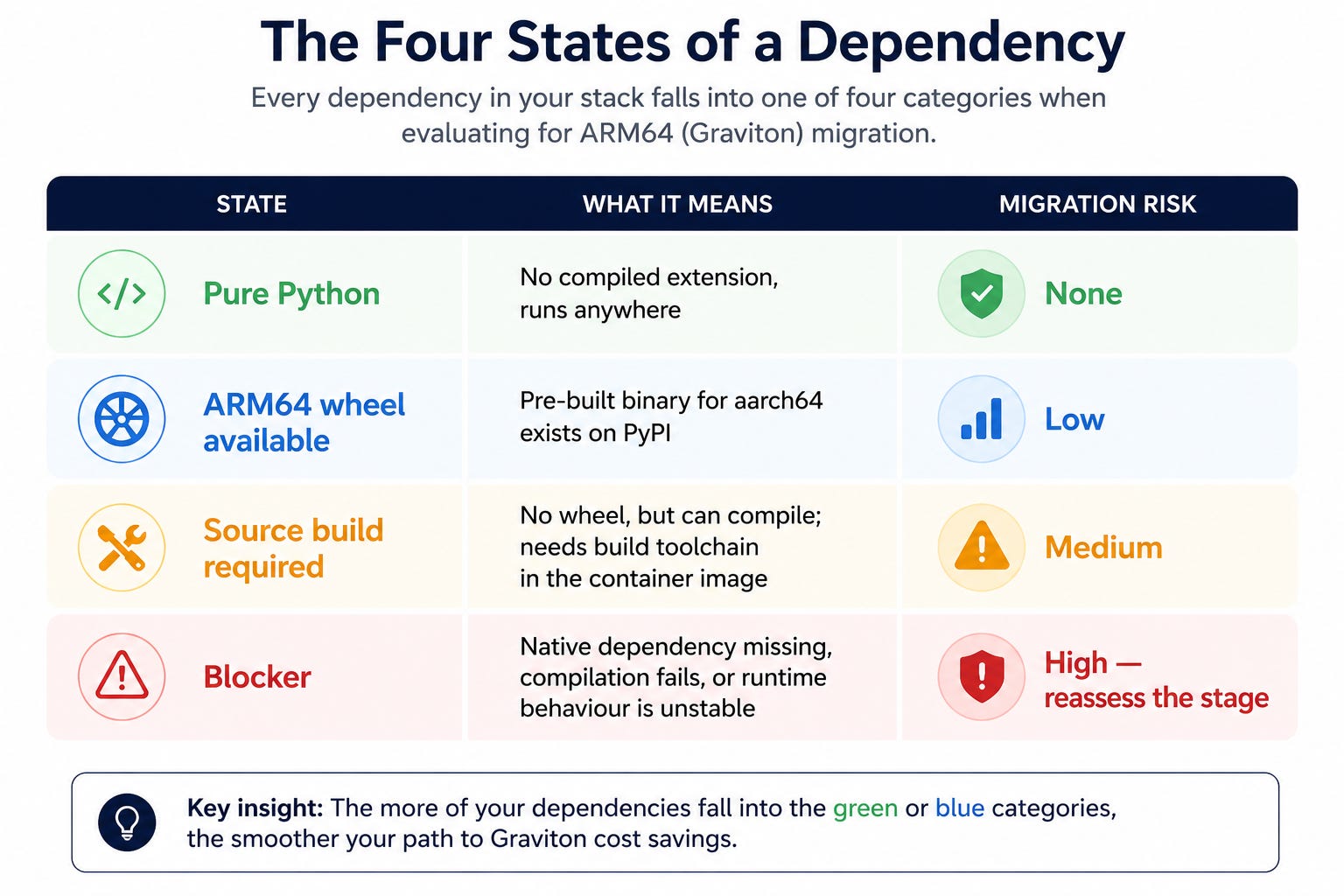
This matrix is the actual output of a Graviton readiness assessment. Not a benchmark. Not a cost model. The wheel matrix.
The Parjanya Case Study: From 1/4 to 3/4
Parjanya’s pipeline had four compute stages, each containerised and isolated. When the first Graviton migration attempt was made, only one — the deduplication stage — made it onto ARM64. The other three were blocked.
Here is what happened at each stage:
Stage 1: RAW Processing (Blocked → Eventually Bypassed)
Camera RAW files require binary parsing to extract embedded JPEGs. The dependency chain pulled in native image parsers without clean aarch64 wheels. Compilation from source failed or produced unstable binaries in the Lambda container environment.
Resolution: The stage architecture changed. Rather than fight a fragile native dependency chain, the pipeline design shifted to extract JPEG previews at ingest — earlier in the flow — reducing the surface area where native RAW parsing was required.
Stage 2: CLIP-IQA Scoring (Blocked → Replaced)
CLIP-IQA was being used for visual quality scoring. It had two problems:
Wheel problem: The ARM64 wheel chain for its dependencies was incomplete. Installing it in a Graviton Lambda container was unreliable.
Model problem: CLIP-IQA was trained on stock photos, not professional RAW captures. It accepted only ~1% of professional images, making it useless for the actual curation use case.
Resolution: The entire stage was replaced with a rule-based technical validator — exposure clipping detection, blur scoring, sharpness scoring, and perceptual hashing. No ML forward pass. No compiled extensions in the hot path. The new validator ran in pure Python, deployed cleanly on ARM64, and executed in under 100ms per image.
This is the single most important insight from the Parjanya migration:
The fastest path to ARM64 is sometimes not to migrate the workload. It is to replace the workload.
The new parjanya-technical_validator runs on arm64 with Python 3.12 and 512 MB memory. It is not a compromise — it is measurably better: faster, cheaper, more correct, and production-verified.
Stage 3: GPU Inference (Intentional Hard Boundary)
The VLM inference stage runs Qwen3-VL-8B-Instruct and requires CUDA. CUDA is the hard architectural boundary.
CUDA is NVIDIA’s parallel computing platform. It runs on NVIDIA GPUs, which are paired with x86_64 hosts in most production setups including AWS g5 instances. There is no ARM64 CUDA story in Lambda.
Resolution: The GPU inference stage was not migrated. Instead, the control plane was separated from execution:
A lightweight Lambda — ARM64 — handles scheduling logic: when to scale the GPU fleet, when to drain it
The actual VLM inference runs on EC2 g5 instances in an Auto Scaling Group
The Lambda no longer needs ML libraries, so it migrated to Graviton without any dependency issues
This is architectural isolation — moving the ARM64-compatible logic (scheduling, orchestration) onto Graviton and leaving the ARM64-incompatible logic (GPU inference) exactly where it belongs.
Stage 4: Deduplication (Original Success)
Small, CPU-bound, dependency-light. Perceptual hashing with no native C extensions in the hot path. This was the function that migrated cleanly from day one, and it remains the model for what “Graviton-ready” looks like: pure logic, minimal native dependencies, well-supported Python ecosystem.
The Current State
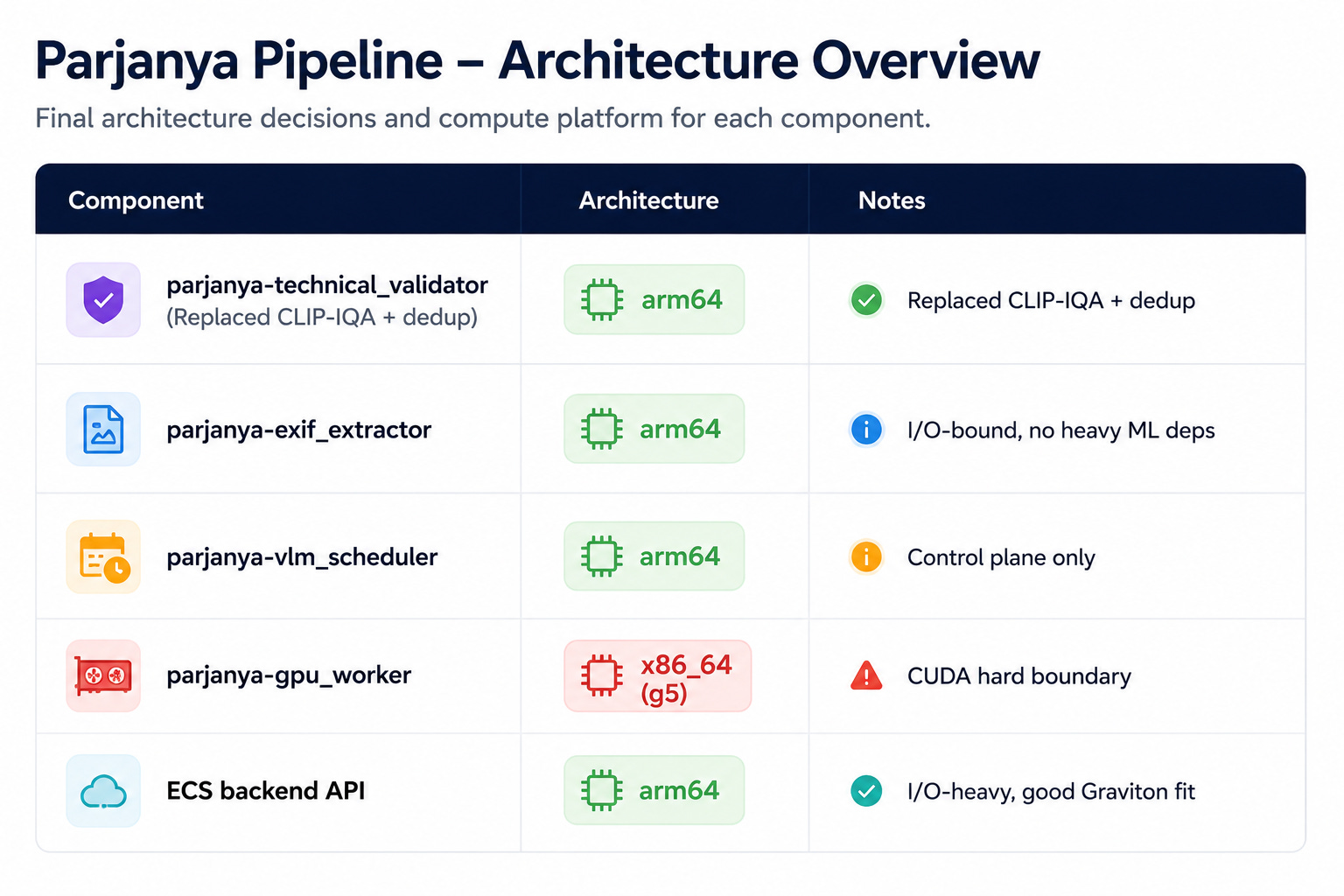
Three of four Lambda functions on Graviton (+1 scheduler). The remaining x86 workload is the one that genuinely belongs there.
Why ARM Wheels Fail: The Root Causes
Understanding why a package lacks an ARM64 wheel helps you predict and resolve failures faster.
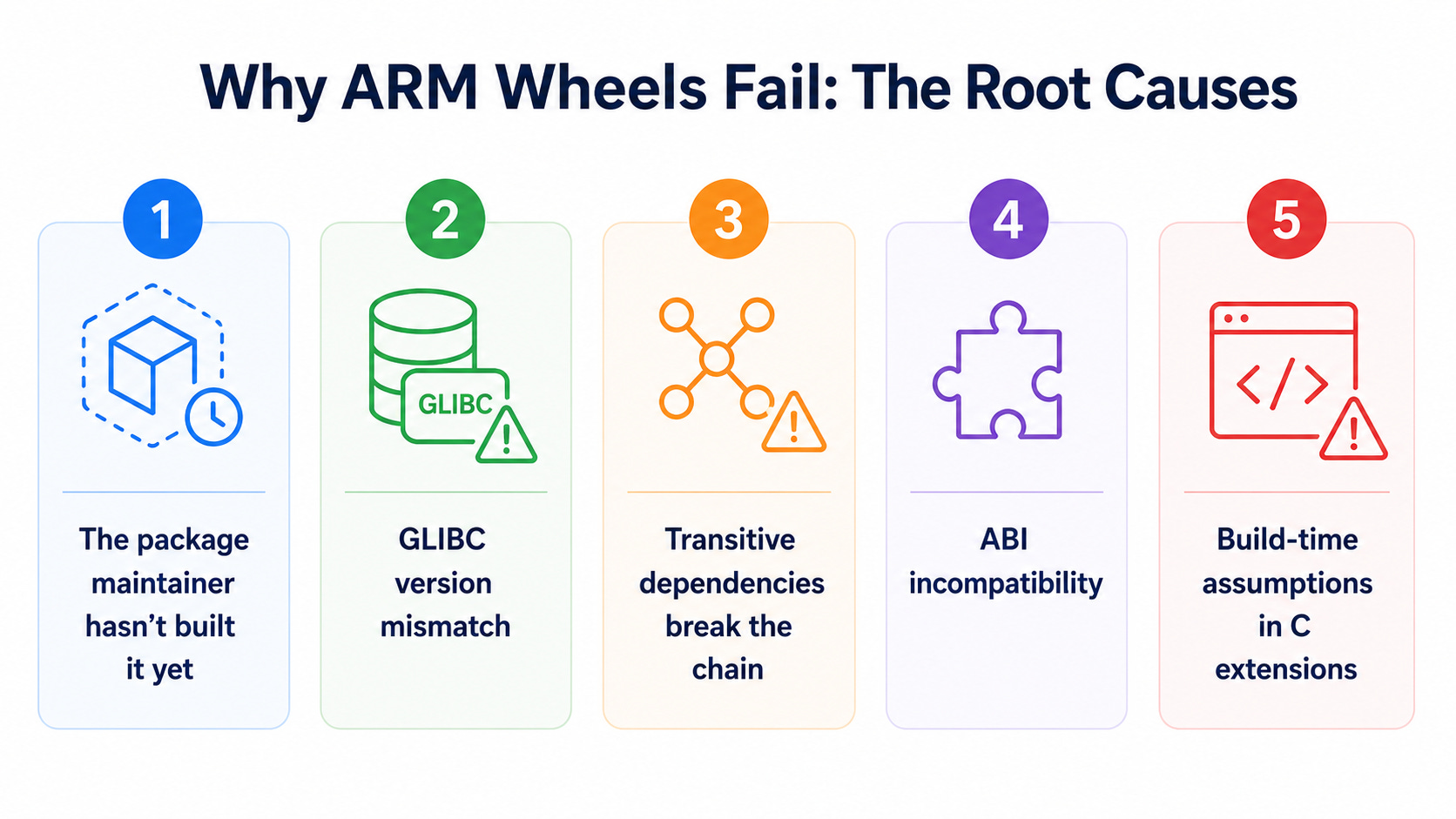
1. The package maintainer hasn’t built it yet
Many packages added aarch64 wheel support in 2022–2024 as AWS Graviton gained adoption. Packages that haven’t been updated since then may still not publish ARM64 wheels. This is solvable by checking the current release on PyPI — support often appears in later versions.
2. GLIBC version mismatch
Lambda’s ARM64 runtime uses Amazon Linux 2023. A wheel built against an older GLIBC version (manylinux2014) may not install cleanly in that environment. When you see installation errors that reference GLIBC, this is the cause. The fix is to build your container image from the correct ARM64 base image and verify wheel compatibility inside it — not on your development machine.
3. Transitive dependencies break the chain
Even if the top-level package publishes an ARM64 wheel, its transitive dependencies may not. OpenCV is a canonical example: opencv-python may install, but a transitive dependency on a specific image codec library may not have an ARM64 wheel. The failure surface is the entire dependency tree, not just the packages you explicitly listed.
4. ABI incompatibility
Some packages have version-specific ABI contracts. A package pinned to an older version may have published an x86_64 wheel for that version but not an ARM64 one. When you pin for stability and the pinned version predates ARM64 support, you are stuck — until you unpin.
5. Build-time assumptions in C extensions
Some C extensions were written with x86 assumptions baked into SIMD code paths, memory alignment behaviour, or endianness handling. These may compile on ARM64 but behave incorrectly at runtime. This is rare but dangerous — it is the category where correctness testing matters most.
A Practical Evaluation Framework for Any Product
The following process translates the Parjanya experience into a repeatable assessment for any Lambda-based system.
Phase 1: Dependency Audit (Before Touching Infrastructure)
For every Lambda or containerised service, generate the full dependency tree including transitive dependencies:
pip install pipdeptree
pipdeptree --warn silence
Then, for every package with a native C extension (you can identify these by checking if the installed package contains .so files):
find /path/to/site-packages -name "*.so" | sortClassify each package against the four-state matrix above. The output is your wheel matrix — one row per native dependency, one column per state.
Phase 2: Build Environment Test (Before Assuming Local Results)
Do not test ARM64 compatibility on your development machine. Build inside an ARM64 environment:
# Docker on an Apple Silicon Mac or a Graviton EC2 instance
docker build --platform linux/arm64 -f Dockerfile.arm64 .
The Lambda execution environment is Amazon Linux 2023 on aarch64. Your build environment should match this exactly. A dependency that installs cleanly in a generic ARM64 Docker image may still fail in the Lambda runtime — validate inside the correct base image.
Phase 3: Runtime Validation (Beyond Installation)
Successful installation is not the same as correct runtime behaviour. For packages that made it through the build:
Run your actual workload, not a smoke test
Measure latency and memory usage under ARM64 — they may differ from x86 even when the package installs cleanly
For any package in the “source build required” category, verify that the compiled binary links against the correct system libraries at runtime
Phase 4: The Three-Question Decision Gate
For each service in your stack, answer these three questions:
Does every native dependency have an ARM64 wheel for my Python version and target runtime?
If yes: proceed to migration
If no: go to question 2
Can I build from source reliably in CI, in the correct ARM64 environment, with the correct GLIBC version?
If yes: proceed with source-build path; add a CI gate that fails if compilation regresses
If no: go to question 3
Can I replace the dependency or the entire stage with something ARM64-compatible?
If yes: replace it — this is often the better outcome anyway
If no: this stage stays on x86; isolate it intentionally rather than blocking the rest of the migration
This decision tree is what the Parjanya migration followed, even if it was not formalised until the second iteration.
Phase 5: Architectural Boundary Declaration
For every stage that cannot move to ARM64, declare the boundary explicitly in your architecture documentation:
What is the technical reason it stays on x86 (CUDA dependency, missing wheel, untested behaviour)?
What would need to change for it to become migratable?
Is the x86 stage fully isolated so that the ARM64 migration of other stages is not blocked by it?
The goal is intentional architecture, not incomplete migration. A GPU inference stage that stays on x86 by design is not a failure. It is a correct architectural boundary.
What This Means for New Products: Building for ARM Portability
If you are building a new product and want to default to Graviton for cost efficiency, the considerations are different from migration. The choices you make at the start of your architecture will determine how much of the system can run on ARM64.
Choose dependency-light stages where possible
The deduplication stage in Parjanya worked on Graviton from day one because it had minimal native dependencies. When designing a new service, ask whether a pure-Python or well-supported-wheel implementation can solve the problem before reaching for a heavier ML or native library.
Treat CUDA as a hard architectural boundary from the start
If a stage requires GPU inference, isolate it behind a clean interface from day one. The scheduling logic, the orchestration, the result handling — all of that can run on ARM64. Only the GPU execution itself needs x86. Design for that split explicitly rather than letting the GPU requirement contaminate surrounding stages.
Version-pin with ARM64 wheel availability in mind
When locking dependency versions for reproducibility, verify that your pinned versions ship manylinux_aarch64 wheels. A version that was pinned for stability before the package added ARM64 support will block migration silently — you will not know until you try to build.
Build in CI on ARM64 from day one
Adding ARM64 build validation to your CI pipeline when you start a project costs almost nothing. Adding it after 18 months of x86-first development costs weeks of debugging. Many packages add and remove ARM64 wheel support across versions; having a CI gate that verifies ARM64 builds on every dependency update catches regressions immediately.
Use the 20% Lambda pricing delta as a design signal
AWS prices ARM64 Lambda at approximately 20% less than x86. That is not just an operational saving — it is a signal about where to route compute. If a function is trivially portable (pure Python, well-supported wheels), choosing x86 without evaluating ARM64 first is a deliberate decision to pay a 20% premium for no benefit.
The AWS-Specific Caveat
Everything in this post is calibrated to AWS. The cost numbers, the Lambda architecture flag, the Graviton family of processors, the manylinux_aarch64 wheel availability for AWS runtimes — these are AWS-specific.
Other cloud providers offer ARM compute. Azure has Ampere A1-based VMs. GCP has Tau T2A. But:
Serverless ARM support (equivalent to Lambda arm64) is not uniformly available or mature across providers
The degree of AWS-specific optimisation in the Python scientific and ML ecosystem — particularly for Graviton NEON instructions — is not replicated elsewhere
Cost structures differ; the 20% pricing delta is an AWS Lambda figure and does not translate directly to other billing models
If you are building a multi-cloud or cloud-agnostic system, treat Graviton optimisation as an AWS-specific tuning layer rather than a foundational architectural decision. The portability of your ARM64-compatible stages will transfer. The AWS-specific performance characteristics will not.
The Real Cost Model
The standard framing of Graviton savings is “20% cheaper Lambda.” That is accurate but incomplete. The full savings model for an architecture like Parjanya’s has four components:
Lower per-invocation Lambda cost on ARM64 (~20% pricing delta, compounding with every invocation)
Avoided NAT data-path spend — VPC gateway endpoints route S3 and DynamoDB traffic without NAT tax; this is infrastructure rather than ARM64, but it compounds with the migration
Reduced ML over-processing — a rule-based pre-filter like
parjanya-technical_validatorrejects bad images before they reach the GPU queue; every rejected frame is a GPU invocation that never happensLower operational overhead — fragile native builds create deployment failures, cold start issues, and CI complexity; removing them reduces engineering time
For a high-volume pipeline, component 3 often dominates. The ARM64 savings from the validator are real. But the savings from not running expensive GPU inference on images that would have been rejected anyway are an order of magnitude larger.
This is the correct way to think about Graviton adoption: not as a compute cost reduction in isolation, but as an opportunity to reconsider stage design, dependency choices, and processing flow in ways that compound the savings.
Summary
The ARM wheel is the gatekeeper to Graviton savings. Not the hardware, not AWS support, not your application code. The compiled binary distribution of your Python dependencies — and whether it exists for aarch64 — is what determines whether a given Lambda function can run on Graviton.
The practical conclusions from Parjanya’s full migration arc:
Audit your wheel matrix before you plan your migration. The output tells you which functions migrate, which need source builds, and which need architectural changes.
Build in an ARM64 environment that matches your Lambda runtime. Local results on x86 do not predict ARM64 install success.
Replacement is often faster than migration. A fragile ML stage replaced by a dependency-light rule-based implementation solves the ARM64 problem, the reliability problem, and often the correctness problem simultaneously.
Isolate x86 hard boundaries explicitly. CUDA is the cleanest example — design around it rather than pretending it is temporary.
Partial adoption is architecture, not failure. Running 3 of 4 Lambda functions on Graviton with an intentional x86 boundary at the GPU stage is a correct outcome.
Graviton adoption is not a hardware decision. The hardware is already ready. It is an ecosystem decision — and the ARM wheel matrix is where that decision lives.
Further Reading
AWS Graviton Getting Started – Python — The canonical reference for why Python version and GLIBC version matter for wheel compatibility
Migrating AWS Lambda functions to ARM-based Graviton2 — AWS’s official guide; read between the lines for what is assumed about dependency simplicity
AWS Graviton Technical Guide — Deep reference on runtime support and ecosystem maturity by language
Why We Could Only Use AWS Graviton for 1 of Our 4 ML Lambdas — First Parjanya post: the ecosystem reality check
From 1/4 to 3/4: Re-architecting an ML Pipeline for Graviton — Second Parjanya post: the re-architecture and cost analysis
AWS Graviton4 vs Intel x86: From $10 POC to Production Validation — The original POC that established the cost and performance baseline

