
When you’re building a startup, the default path is obvious:
One AWS account.
Maybe two if you’re feeling disciplined.
One for development. One for production.
It sounds clean. It sounds sufficient.
For a while, I thought so too.
As Parjanya evolved into a multi-tenant image processing platform with real workloads, real customers, and increasingly complex infrastructure, I started asking a different question:
What does the minimum viable production-grade AWS architecture actually look like?
The answer wasn’t one account.
It wasn’t even two.
It was three.
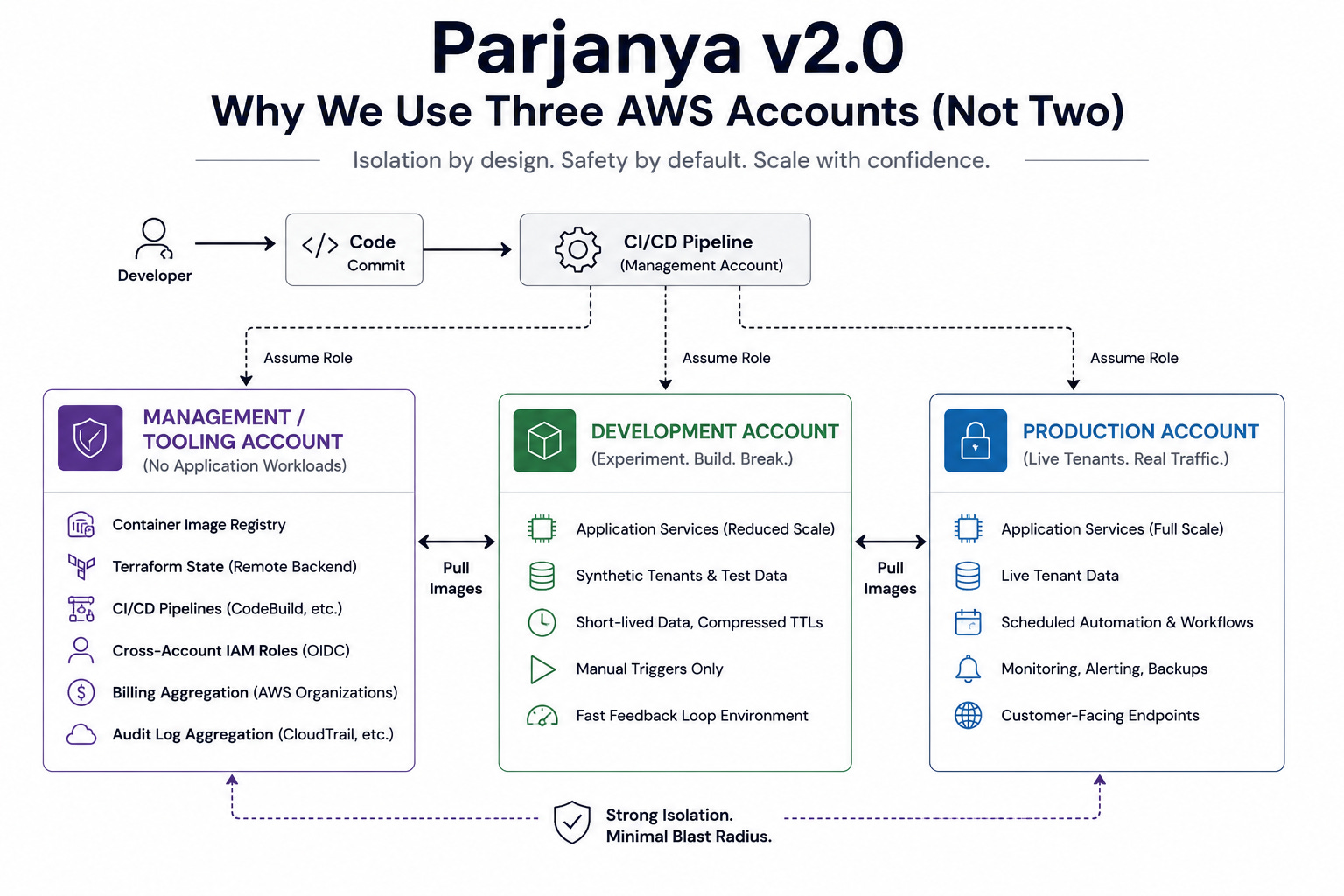
Today Parjanya v2.0 runs on a three-account AWS structure:
Management / Tooling
Development
Production
It added complexity upfront.
It also removed entire categories of risk that I didn’t want to discover during an incident.
This post explains why I made that decision, what problems it solved, what I intentionally chose not to build yet, and how I think other SaaS teams should approach the same trade-offs.
The Setup We Started With
Like most startups, we began with a single AWS account.
Everything lived there:
Development resources
Production workloads
CI/CD pipelines
Container registries
Shared infrastructure
The setup was fast.
The problem with fast is that it often hides risk.
Nothing feels wrong until the day an experiment, a permission mistake, or an infrastructure change unexpectedly affects production.
As we started formalising Parjanya v2.0, I realised I didn’t want to keep relying on discipline alone.
I wanted structural safety.
That’s when the three-account model emerged.
The Third Account Isn’t Staging
Whenever I mention three accounts, people assume I mean:
Dev
Staging
Prod
That’s not what I built.
The structure is:
Management / Tooling Account
This account owns the operational plumbing:
Container registry
Terraform state
CI/CD definitions
Cross-account IAM roles
Billing aggregation
Audit aggregation
Importantly, it never runs application workloads.
Development Account
This is where experimentation happens.
Infrastructure changes.
New features.
Testing.
Things break here by design.
Production Account
This runs live tenant workloads and customer-facing infrastructure.
Nothing experimental belongs here.
The critical insight is that the third account isn’t another environment.
It’s neutral territory.
It owns the things both Dev and Prod need, without forcing either environment to depend directly on the other.
The First Problem It Solves: Artifact Ownership
Consider a simple CI/CD pipeline.
It builds a Docker image.
Where should that image live?
If the registry sits in Dev, then Production depends on Development.
If the registry sits in Prod, Development depends on Production.
Neither feels right.
The Management account solves this neatly.
CI builds once.
Pushes once.
Both Dev and Prod pull the exact same artifact.
No rebuilds.
No copies.
No divergence.
One image.
One source of truth.
Multiple promotions.
That sounds like a small detail until you’re debugging an issue and need absolute confidence that Production is running the same artifact that passed validation earlier.
The Real Reason: Blast Radius
This is the reason that mattered most to me.
AWS accounts are the strongest isolation boundary AWS provides.
A broken IAM policy.
An accidental deletion.
A Terraform mistake.
A bad deployment.
These things cannot casually cross account boundaries.
That matters because Development should be chaotic.
People test things.
Infrastructure changes.
Experiments happen.
Failures are expected.
Production should not inherit that chaos.
With separate accounts, Dev can fail spectacularly and Prod remains untouched.
That’s a much stronger guarantee than “everyone promises to be careful.”
Credentials Become Safer by Default
A surprisingly useful side effect is credential isolation.
When someone is working in the Dev account, their credentials only see Dev resources.
They aren’t merely discouraged from touching Production.
Production is outside their scope.
The same applies to automation.
The deployment pipeline for Dev assumes different roles than the deployment pipeline for Prod.
The separation isn’t cultural.
It’s structural.
And structural controls tend to survive stressful situations much better than process documents.
Cost Visibility Becomes Obvious
Another benefit I underestimated was cost attribution.
Using AWS Organizations means every account naturally reports its own spending.
Development spend is visible.
Production spend is visible.
There’s no tagging strategy to maintain.
No allocation spreadsheets.
No cost archaeology.
When the AWS bill changes, I immediately know whether it was caused by:
a production feature,
increased tenant activity,
or a development experiment that ran longer than intended.
That clarity is surprisingly valuable.
What Lives Where
The distribution is straightforward.
Management Account
Container registry
Terraform backend
CI/CD pipelines
Cross-account IAM roles
Billing aggregation
Audit logging
Development Account
Full application stack
Synthetic tenant data
Reduced-scale services
Fast feedback loops
Manual automation triggers
Production Account
Live tenant workloads
Customer-facing services
Scheduled automation
Alerting
Full-scale infrastructure
The key principle is simple:
No application workloads run in the Management account.
It exists to operate the platform, not host it.
The Deployment Flow
The deployment path now looks like this:
Code lands on the main branch.
CI/CD runs in the Management account.
The pipeline assumes a deployment role in Dev.
Integration tests run.
The same artifact is promoted into Prod.
Production never builds code.
Production never owns source repositories.
Production simply runs validated artifacts.
That separation removes a surprising amount of operational risk.
What I Chose Not to Build Yet
Architecture decisions are often more about what you don’t build than what you do.
No Staging Environment
Yet.
A true staging environment means maintaining a production-like replica.
That’s useful.
It’s also expensive.
At our current scale, good automated testing in Dev provides far more value than maintaining another full environment.
The architecture already supports a staging account.
I simply chose not to pay for it yet.
No Tenant-Level VPC Isolation
Today tenant isolation is logical rather than physical.
Data boundaries are enforced at the application and storage layers.
Per-tenant VPCs or accounts add stronger isolation, but also significant complexity.
Most SaaS companies don’t need that level of separation until enterprise customers explicitly require it.
We’re not there yet.
No Dedicated Security Account
AWS would ideally have:
Management
Security
Dev
Prod
with centralized immutable audit storage.
I agree with that architecture.
I also believe infrastructure maturity should follow business reality.
We’ll add a dedicated security account when compliance requirements justify it.
Not before.
My Rule of Thumb for Startups
If you’re building a SaaS product and you’ve moved beyond proof-of-concept, my recommendation is straightforward:
Start with Three Accounts
Management.
Development.
Production.
The setup overhead is measured in hours.
The long-term safety benefits are measured in years.
Don’t Rush Into Staging
Build staging when your release process genuinely requires it.
Not because every architecture diagram on the internet includes one.
Use AWS Organizations Early
Retrofitting Organizations later is painful.
Starting with it is easy.
Future-you will be grateful.
Treat the Management Account as Permanent Infrastructure
Products evolve.
Tooling evolves.
The operational foundation should remain stable.
The Management account owns the plumbing, not the application.
Looking Ahead
The current structure gives me a clear path forward.
When the platform grows, I can add:
A staging account
A dedicated security account
Enterprise tenant accounts
Each becomes an extension of the existing architecture rather than a redesign.
That’s exactly what I wanted.
The Takeaway
The strongest boundary in AWS is the account boundary.
Use it deliberately.
For me, three accounts turned out to be the minimum structure that delivered:
blast-radius isolation,
clean credential scoping,
predictable deployments,
and clear cost attribution.
Not because it’s elegant on a diagram.
Because it makes operational mistakes dramatically less expensive.
Parjanya v2.0 is being built with longevity in mind.
The three-account architecture is one of the quiet decisions that makes everything else possible.
The architecture looks clean on a diagram.
Reality was messier.
Moving Parjanya from a single AWS account to a three-account model meant refactoring Terraform state, redesigning IAM trust relationships, rebuilding deployment pipelines, and discovering that AI-generated infrastructure code is only as good as the context you give it.
Tomorrow, I’ll share the implementation story—what broke, what surprised us, and why the hardest part of infrastructure isn’t Terraform itself, but managing context across systems, repositories, and teams.
This is part of my ongoing field notes from building Parjanya v2.0 — a multi-tenant image QA platform. I write about the architectural decisions, trade-offs, mistakes, and lessons learned while building it in public.
