
There are bugs that announce themselves immediately.
A service crashes.
A file refuses to open.
A test turns red.
And then there are bugs that are much more dangerous: the system works exactly as designed, produces a perfectly reasonable answer, and is still completely wrong.
I recently ran into one of those while building Parjanya 2.0, our image QA platform for professional photographers.
A photographer uploaded a batch of scanned medium-format negatives. Twenty-six images eventually turned out to be affected. Some were rejected as blank before they ever reached AI analysis. Others went through the pipeline and received what looked like perfectly plausible photographic criticism.
The interesting part wasn’t just the TIFF bug.
It was everything around it: how I found it, how the first hypothesis was wrong, how a correct rejection concealed an upstream defect, how two corrupted images escaped detection because they were not quite blank enough, and how fixing one line of code uncovered two more bugs waiting behind it.
That made this incident worth writing down.
The platform I was building
Parjanya 2.0 is designed around a simple idea: before asking an AI model to judge a photograph, I should first make sure I am actually giving it a photograph.
The platform ingests batches of images and runs each one through two stages.
The first is a fast technical gate. It doesn’t need a vision model. It checks whether the file can be decoded, whether its resolution is sane, whether it actually contains photographic content rather than a blank rectangle, and whether it is a duplicate.
Only after an image survives those checks does it reach the second stage, where a vision-language model evaluates things such as composition, sharpness, exposure and other characteristics that matter to a working photographer.

Most of the images we see are JPEGs and RAW camera files and supported 34 formats
Some are TIFFs.
And TIFF is one of those formats where the filename tells you much less than you think.
A TIFF can represent a surprisingly large number of combinations of bit depth, channels, byte order, tone conventions and other metadata.
This incident came from one particular combination:
16-bit + single-channel grayscale TIFF.
Chapter 1: The rejection was telling the truth
The first signal was straightforward.
A batch of TIFFs was being rejected within seconds of upload, before any AI analysis ran.
That timing mattered.
Our technical gate was doing exactly what it was supposed to do: decode the image, check its dimensions and determine whether there was meaningful visual content.
The blank-frame detector uses image statistics such as luminance entropy and standard deviation. If both are sufficiently low, the image is considered blank and rejected before we spend GPU time on it.
Upon inspecting one of the rejected files and verified the source directly.
It was not blank.
It had a wide tonal range. The pixel data was fully populated. It was a perfectly legitimate photograph!
Then I ran our own preview-generation code against that exact file.
And there it was.
A completely white rectangle - blank frame.
The source image was fine.
Our preview was not.
The blank detector was measuring the preview, not the original. So from its perspective, the rejection was completely correct.
That distinction turned out to be the entire incident.
The gate wasn’t wrong about the preview. The preview was wrong about the photograph.
That is a particularly nasty class of bug.
A rejection with a technically correct reason can still be evidence of a failure upstream.
Chapter 2: 65,535 is not 255
To understand what happened, I had to go back to two fairly basic imaging concepts: bit depth and channels.
A normal 8-bit image stores each pixel between 0 and 255.
A 16-bit image stores each pixel between 0 and 65,535.
That’s 256 times more possible tonal values.
You don’t need that precision because your monitor can display 65,536 individual shades.
You need it because the file is often an intermediate master.
That is particularly important in film scanning (archivals).
A photographer or archivist can scan a negative at 16-bit precision and preserve a tremendous amount of tonal information. The actual interpretation—shadow recovery, highlight adjustment, grading, dodging and burning—can happen later without throwing away information prematurely.
Then there are channels.
A colour image normally has three channels: red, green and blue.
A grayscale image needs only one.
That isn’t a limitation. It is the correct representation when there is no colour information.
So the file that broke our pipeline was not strange at all.
It was actually a very reasonable professional archival file:
16-bit + 1-channel grayscale TIFF.
In fact, the file carried an embedded profile named EPSON Gray – Gamma 2.2, along with metadata identifying the editing software used.
This looked exactly like the kind of file I should expect from a real scan-to-digital workflow.
And that was precisely why our assumption about “supported TIFF” wasn’t good enough.
Chapter 3: My first hypothesis was wrong
My first thought was obvious:
Maybe 16-bit TIFFs are the problem.
Then production gave me the counterexample.
The same batch contained both:
Same bit depth.
Same encoder.
Same photographer.
Same upload session.
The variable that changed was the channel count.
That immediately narrowed the problem down.
It wasn’t simply “16-bit TIFF.”
It was the combination:
16-bit + single-channel grayscale.
That was the first important lesson for me:
When production gives you naturally occurring controlled experiments, use them.
I didn’t need to invent a synthetic test case to prove that 16-bit wasn’t the problem. The customer’s batch had already done the experiment for me.
Chapter 4: The one-line conversion that wasn’t harmless
Once I followed the image through the preview pipeline, the mechanism became surprisingly small.
Our imaging library automatically rescales 16-bit samples when it decodes certain multi-channel colour images.
For single-channel 16-bit data, however, it returned the raw 16-bit values.
The next step in our pipeline was an unconditional conversion to standard 8-bit RGB.
That conversion was safe for the image modes we had exercised.
It wasn’t safe for this one.
Instead of rescaling 16-bit values into the 8-bit range, it effectively clipped them.
Those two operations sound similar.
They are not.
What should happen is:
16-bit 200    → 8-bit 1
16-bit 32768  → 8-bit 128
16-bit 65535  → 8-bit 255
What actually happened was closer to:
16-bit 200    → 8-bit 200
16-bit 256    → 8-bit 255
16-bit 65535  → 8-bit 255
Everything above 255 was flattened to 255.
And 255 is white.
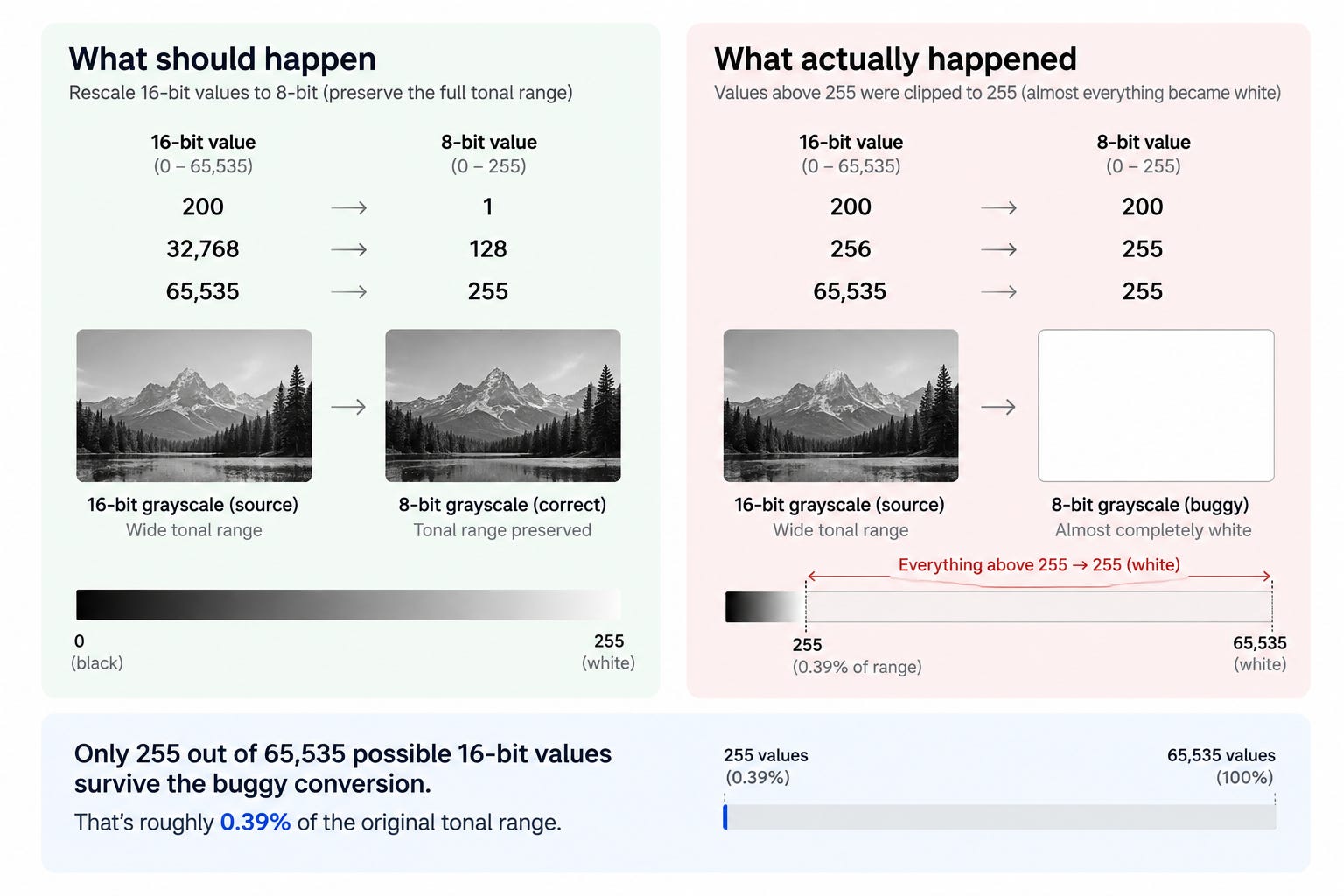
The arithmetic makes the severity obvious.
An 8-bit conversion preserves only 255 values below the maximum out of a possible 65,535.
That’s roughly 0.39% of the original tonal range.
For a typical scanned negative using a broad portion of the 16-bit range, almost everything therefore became white.
The photograph hadn’t disappeared.
We had mathematically crushed it into a white rectangle.
Chapter 5: The bug was even more interesting than I first thought
At this point I had an explanation for the obviously rejected images.
But something didn’t quite add up.
Two larger TIFFs in the same batch had apparently processed successfully.
That initially looked like evidence that the bug affected some narrower scanner-specific variant.
So I went back and measured them instead of trusting the earlier interpretation.
That changed the story.
They weren’t actually healthy.
They were also 16-bit single-channel grayscale files.
Their previews were approximately 98% and 96% solid white.
They had simply escaped our blank-frame detector.
Why?
Our blank check uses two conditions: low entropy and low variance.
Those two images had slightly more surviving shadow information, because they originated from digital captures converted to black-and-white rather than from analog film scans.
That tiny amount of surviving information was enough to push their variance above the rejection threshold.
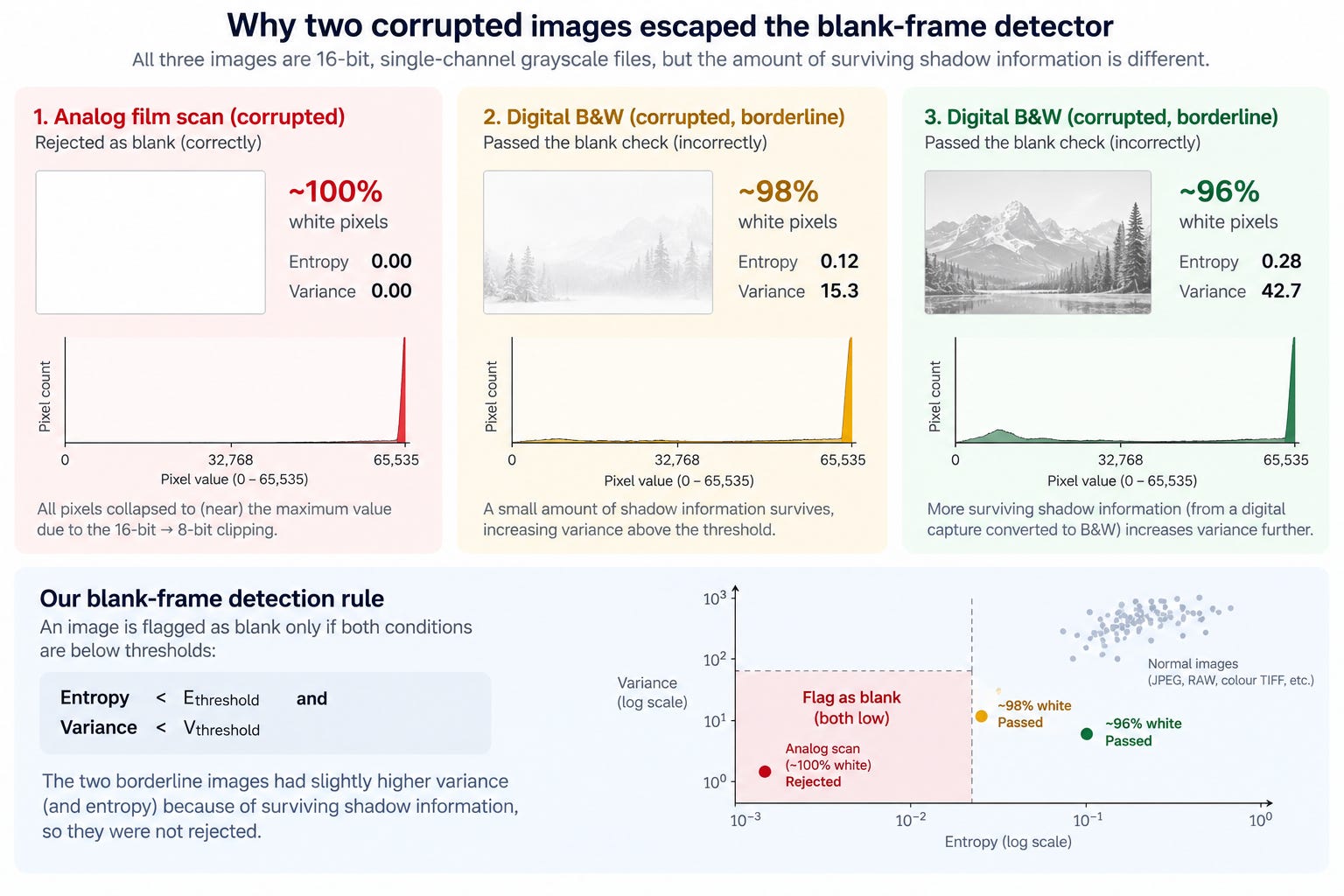
So the images were not rejected.
They went to the AI stage.
And the AI did exactly what I had asked it to do.
It looked at a nearly blank white rectangle and produced a confident photographic assessment—essentially describing it as severely overexposed.
That was much more concerning than a simple rejection.
A visibly broken file gets investigated.
A corrupted file that passes the gate and receives a plausible AI explanation can look completely legitimate.
The original automated log suggested 24 affected images.
The actual number was 26.
Two corrupted images had successfully made it far enough downstream to receive convincing-looking AI output.
That changed how I thought about remediation.
I couldn’t say:
“Find all the files that were rejected and fix them.”
I had to say:
“Find every file that has the defect.”
The difference sounds subtle.
Operationally, it is enormous.
So we identified remediation candidates using the actual container metadata—bit depth and channel count—not the symptom produced by the broken pipeline.
Chapter 6: The obvious fix took ten minutes. Shipping it took three days.
The immediate fix looked almost embarrassingly simple:
Rescale the 16-bit values to 8-bit before converting to RGB.
I could write that in minutes.
I deliberately didn’t ship it.
Because once you touch a central image-conversion path, the question isn’t:
“Does this fix the file that broke?”
The question is:
“What else passes through this code?”
So I built synthetic files covering sixteen different variants.
Different byte orders.
Inverted-tone scans.
Packed sub-byte formats.
Signed samples.
Floating-point samples.
Four-channel print files.
Different combinations of formats that a real imaging library can encounter.
And that exercise immediately found two more problems.
Chapter 7: Fixing the bug almost created a photographic negative
Some scanners use an inverted tone convention.
In those files, zero can represent white rather than black.
At 8-bit depth, the imaging library was silently correcting for that.
At 16-bit depth, it wasn’t.
Previously, our clipping bug had destroyed the image so completely that this difference was invisible.
Once I fixed the clipping, it suddenly mattered.
A naive fix would have transformed some of those scans into photographic negatives.
In other words:
the first bug had been masking the second bug.
That is one of the reasons I have become much more cautious about declaring a conversion problem “fixed” after a single successful test.
Removing one failure mode can expose another one that was hiding behind it.
Chapter 8: Then I found a metadata bug hiding somewhere else
The next surprise wasn’t even in the conversion code.
Our orientation-correction step creates a fresh image object.
That fresh object didn’t retain all of the original technical metadata.
That mattered because the fix needed to know information such as bit depth and tone convention.
If I inspected that metadata early enough in the pipeline, it was available.
If I inspected it after the orientation step, it was gone.
This was a useful reminder that image-processing pipelines aren’t just a sequence of transformations.
They are also a sequence of information loss.
Every transformation potentially changes:
pixel values
dimensions
colour space
metadata
orientation
bit depth
tone interpretation
And once information disappears, a later stage can’t magically recover it.
So the correct place to make a decision isn’t necessarily where the decision is easiest to implement.
It is where the required information still exists.
Chapter 9: I rejected an attractive shortcut
There was another tempting idea.
TIFF files can contain metadata describing the brightest value actually used in the image.
It seemed reasonable to use that value as the denominator when converting 16-bit to 8-bit.
Why scale against a theoretical maximum if I know the maximum value actually present?
Because that would subtly change the photograph.
Imagine a perfectly normal photograph whose brightest pixel is 55,000 rather than 65,535.
Scaling against 55,000 would brighten the entire image.
That isn’t a bit-depth conversion anymore.
It is an automatic contrast adjustment.
And the photographer didn’t ask me to change their exposure.
So we deliberately rejected that shortcut.
The conversion is based on the declared bit depth, not whatever happened to be present in one particular image.
I also locked that decision into a regression test.
Chapter 10: The better fix wasn’t just a better conversion
The most durable change I made wasn’t actually the 16-bit fix.
It was adding a self-checking preview writer.
Instead of assuming:
“The conversion function returned successfully, therefore the preview is good.”
the preview writer now compares meaningful tonal variation before and after the transformation.
If a photograph goes in with substantial tonal variation and comes out essentially flat, the preview generation itself fails.
It refuses to save the preview as if everything succeeded.
That distinction is important.
The system doesn’t need to know that the bug is TIFF.
It doesn’t need to know that the input is 16-bit.
It doesn’t need to know about grayscale channels.
It only needs to recognise something more fundamental:
a photograph went in, and almost nothing came out.
On our known-good conversions, the input/output variation ratio clustered around 1.0.
The broken examples were 0.35 or lower.
The original file that started this investigation was exactly 0.00.
That gives us a generic trip-wire for future bugs we haven’t imagined yet.
And that is much more valuable than a test that only knows about today’s failure.
Chapter 11: The AI wasn’t the problem. The pipeline was.
There is another lesson here that I think matters beyond image processing.
It would have been easy to describe this as an “AI quality” problem.
It wasn’t.
The VLM was downstream of a corrupted image.
It received a nearly blank frame and produced a plausible interpretation of what it saw.
The failure happened earlier.
That distinction becomes increasingly important as we build systems where AI is only one component in a much larger automated pipeline.
If the data entering the model is wrong, a more capable model doesn’t necessarily make the system safer.
It may make the failure more convincing.
That is something I now think about whenever I design an automated workflow:
Before asking whether the model’s answer is correct, ask whether the model received the thing I thought I gave it.
Chapter 12: The second AI session had already fixed it
There was one more twist.
By the time the fix was deployed and I was ready to reprocess the affected images, I discovered that the reprocessing had apparently already happened.
Another session had been working on the same incident in parallel.
Nothing had explicitly told me it was complete.
It was just... done.
The tempting responses were:
Trust that it was already completed.
Run it again just to be safe.
I didn’t want to do either.
Trusting silence isn’t verification.
Blindly rerunning a potentially expensive job isn’t verification either.
So I checked the artefact.
First, I ran the reprocessing tool in dry-run mode.
It still identified the same affected files from their actual container metadata, and all of them now showed as successfully processed.
Then I checked the record store independently.
The timestamps lined up with the deployment window.
Finally, the infrastructure logs showed a burst of preview-generation activity immediately after deployment that was much higher than normal traffic.
Three independent signals.
Only then did I consider the remediation complete.
This is becoming increasingly relevant as engineering moves from one developer sitting in one terminal to multiple people—and increasingly multiple AI agents—working concurrently on the same system.
When two workers might be acting on the same incident, the right question isn’t:
“Did someone say they did it?”
It is:
“Can I independently verify the artifact that proves it happened?”
What actually happened?
The final numbers made the incident much clearer.
Before the fix:
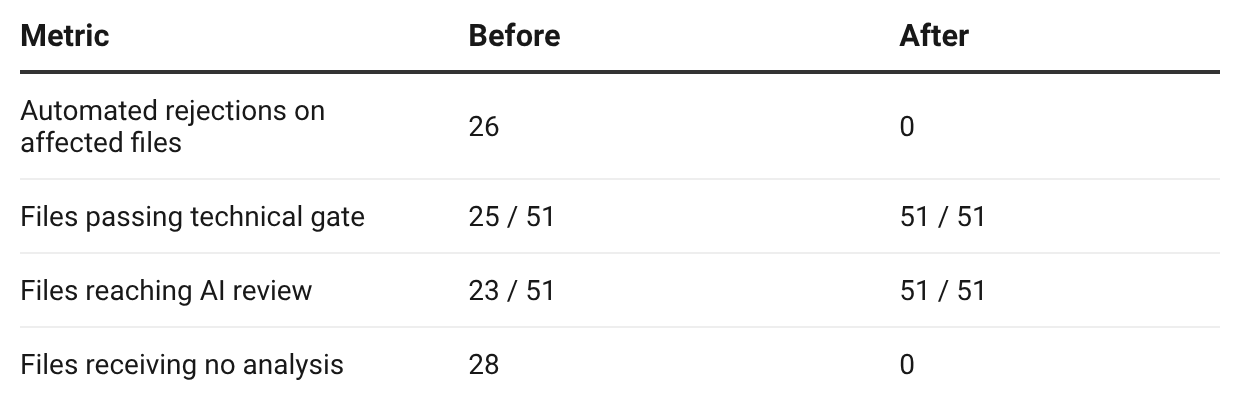
The customer’s batch returned to a normal curation mix: roughly 60% accepted and 40% rejected for genuine photographic reasons such as blur or exposure.
Most importantly, the original source files were never damaged.
The corruption existed entirely in the generated previews.
So remediation was simply a matter of generating those previews correctly.
The entire cycle—from report to root cause, fix, deployment, verification and closure—took three days.
What I would tell another engineering team
1. “Supported” and “decodable” are not the same thing
Putting TIFF on a supported-format list doesn’t mean you’ve supported every real-world TIFF.
TIFF is a container.
Inside that container are many combinations of properties that your pipeline may never have exercised.
A format can be technically supported and operationally untested.
That gap is where this bug lived.
2. A correct rejection doesn’t prove the system is working
Our blank detector was correct.
The preview it examined was wrong.
When an automated check reports a technically accurate failure, I now trace upstream before assuming the input is at fault.
The last check in a pipeline can be completely correct while everything feeding it is broken.
3. Remediate based on the defect, not the symptom
The two images that escaped our rejection logic would have remained corrupted if I had searched only for rejected files.
I had to identify the actual format signature:
16-bit + single-channel grayscale.
The symptom was “blank.”
The defect was something else.
4. The blast radius of a fix can be larger than the blast radius of the bug
The original incident was about clipping.
Testing the fix uncovered inverted-tone behaviour and metadata loss.
If I had stopped after the first successful test, I would have introduced new image corruption while fixing the old corruption.
5. Build checks that don’t know what tomorrow’s bug looks like
A format-specific regression test protects against known failures.
A structural fidelity check can catch unknown ones.
That is why I like the idea of measuring the transformation itself:
Did meaningful image information survive the operation?
6. Verify the artefact, not the silence
Whether the other worker is a colleague on another shift or another AI session running in parallel, “nothing complained” is not evidence of completion.
Look at the output.
Look at the records.
Look at an independent signal.
Then close the incident.
The broader lesson
I started this investigation thinking I had a TIFF problem.
What I actually found was a systems problem.
A professional photographer supplied a perfectly legitimate archival file.
Our software accepted the format.
The file decoded.
The preview-generation function returned successfully.
The automated quality gate correctly detected a blank image.
The AI then produced a plausible assessment on two corrupted images.
Every individual component behaved reasonably according to the information it had.
And yet the system as a whole was wrong.
That’s the part I find most interesting.
As we build more automated products, especially products where traditional software, image processing and AI models sit in the same pipeline, I think we need to become much more interested in fidelity between stages.
Not just:
Did the function return successfully?
But:
Did the meaning survive the transformation?
For Parjanya, that means being increasingly careful about the long tail of real-world photography formats.
For developers, it means testing the combinations that production will eventually discover for you if you don’t.
For photographers, it is a reminder that “supported format” doesn’t necessarily mean “faithfully interpreted format.”
And for founders, it is a reminder that automation doesn’t remove responsibility.
It moves the responsibility upstream.
The system needs to know not only when it can produce an answer, but when it should refuse to trust its own answer.
That is probably the more important fix I took away from this incident.
Parjanya is the image QA platform we’re building as part of Phagyul eco-system for professional photographers. If you’re working on heterogeneous image ingestion, archival photography, AI-assisted review pipelines, or reliability problems in AI-driven systems, I’d love to compare notes.
Related engineering incident: GitHub Issue #87 — 16-bit grayscale TIFF preview corruption
