
Executive Summary
When I developed the Parjanya v2.0 frontend on localhost, I ran into a series of issues that only became obvious later in deployment: CORS and preflight failures, mixed-content blocks, proxy quirks, and security leaks. To solve this and get closer to production-parity, I moved toward a server-to-server pattern: serving the SPA through Amazon CloudFront (with an S3/CloudFront static origin or Lambda@Edge) and serving the API through an Application Load Balancer (ALB) in a VPC. This gives me global caching, TLS/WAF protection, single-origin consistency that removes CORS pain, and lower egress costs.
In this post, I go deep into the localhost development pitfalls, CORS mechanics and misconfigurations, localhost vs cloud-hosted trade-offs, and the migration plan I would follow, along with code snippets, architecture diagrams, tables, and references.
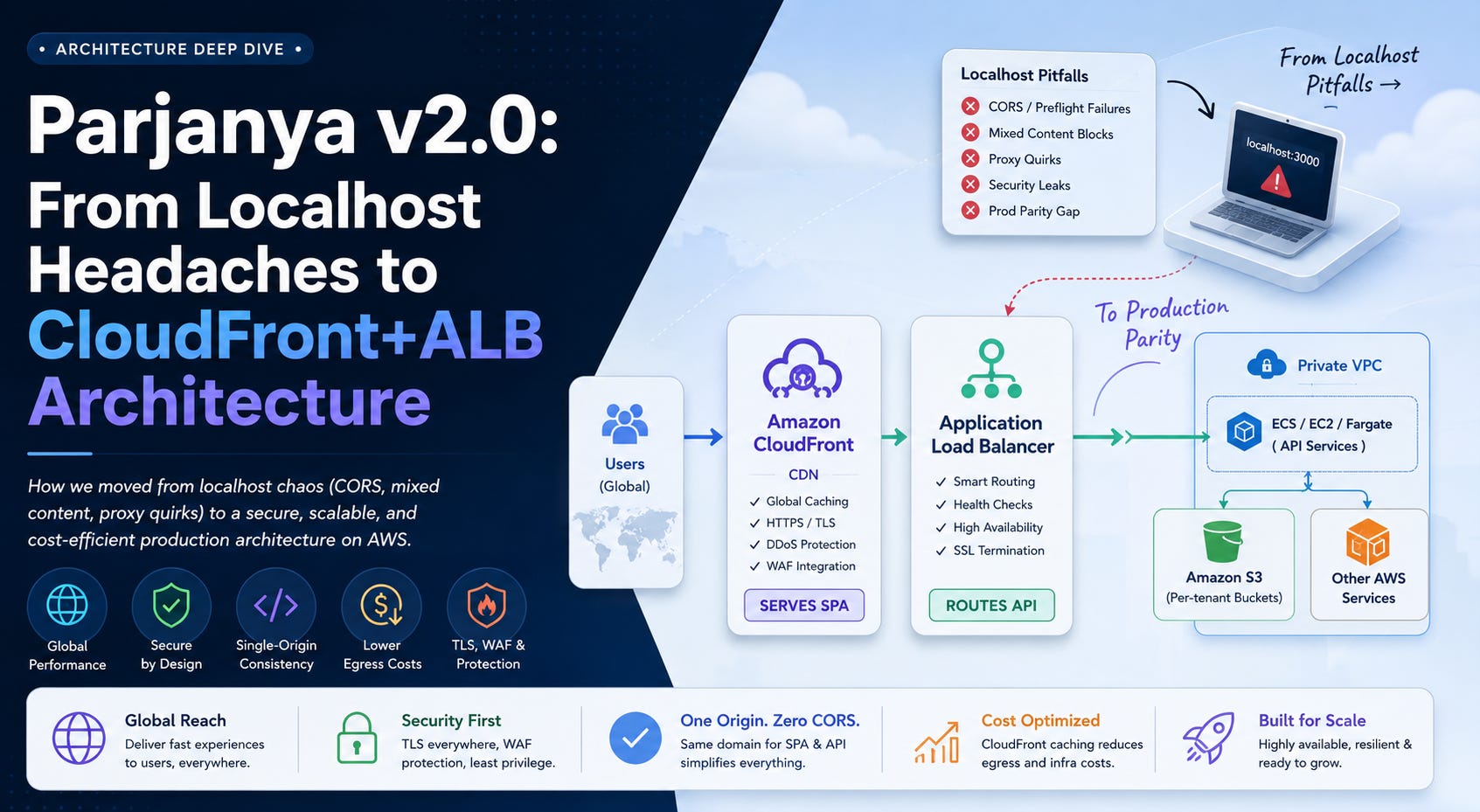
TL;DR
I originally wrote a primer of Parjanya v2.0’s move from localhost-first development to a production-shaped AWS architecture. This shorter repost is the key lesson: localhost is great for iteration, but it hides the boundaries that matter in production. CORS failures, presigned upload issues, and origin mismatch kept pointing to the same conclusion — the right model for modern cloud apps is server-to-server.
Serve the frontend from CloudFront, route backend services through ALB, and let the backend control S3 access and tenant isolation. Production-shaped architecture is not a nice-to-have; it is the difference between a system that merely works locally and one that is actually built to scale.
Background & Context: Parjanya v2.0
Parjanya v2.0 is a multi-tenant SaaS system where each tenant has its own storage and its own backend API. In development, the frontend runs on localhost while talking to AWS services for file uploads and API calls. In production, I intend to serve the SPA from a CDN (CloudFront) and the API behind an ALB.
That split introduced problems for me: local development deviated from production in origin and protocol, which led to CORS and mixed-content issues. The prod parity gap was wide. I often saw developers disable CORS checks or use wildcards on S3 buckets for convenience, but that broke strict production settings and weakened security. LocalStack even ignored S3 CORS rules in some versions, which meant bugs were not caught until deployment.
My setup here is that the Parjanya v2.0 backend is AWS-based (ECS/Fargate or EC2 behind an ALB, with S3, IAM, and related services), and that the frontend is a static app that can be hosted on S3 + CloudFront.
Localhost Development Pitfalls
Switching from localhost to AWS exposed several hidden traps for me. The main issues were:
CORS Preflight Failures
Browsers enforce the same-origin policy, so any cross-domain AJAX or fetch request triggers CORS checks. On localhost, I often used Access-Control-Allow-Origin: * or disabled checks (DISABLE_CORS_CHECKS=1 with LocalStack), which masked issues. In production, the SPA origin, such as https://<cloudfront-id>.cloudfront.net, must exactly match S3 bucket CORS rules; otherwise S3 returns 403 Forbidden.
For example, if only https://api.parjanya.com is in AllowedOrigins, a request from https://<cloudfront-id>.cloudfront.net gets blocked. The root cause is simple: dev used wildcards or localhost origins, while prod locked to the CDN domain.
Origin Drift (Dev vs Production)
A subtle pitfall is that the frontend origin differs in dev (http://localhost:3000) versus prod (CloudFront domain or a custom domain). Code that relies on window.location.origin or environment variables can compute the wrong URLs in production. This drift also means the correct CORS origin and cookie domains can be wrong in prod.
Mixed-Content Blocks (HTTPS vs HTTP)
Browsers on https:// pages block any http:// resources. On localhost, I might use plain HTTP without SSL, but once the SPA is on CloudFront over HTTPS, calls to an unsecured origin, or an S3 HTTP URL, are blocked as mixed content. My fix is to use HTTPS everywhere in AWS (ALB and CloudFront) and enforce redirect-to-HTTPS policies.
Dev Proxy vs True Environment
Many dev setups use a proxy, such as npm proxy settings or a simple NGINX layer, to avoid CORS. For example, NGINX on localhost:8001 forwarding /api/ to the real backend means the browser sees only one origin. That hides CORS, but only in development. In production, the CDN fronts the API with a different host unless I unify the route.
IAM / Bucket Policy Surprises
In dev, a single IAM role or default credential set can accidentally be used for all S3 uploads. That can hide cross-tenant access problems. In AWS, I need separate IAM roles and strict bucket policies per tenant. Bucket policies may also imply a deny if conditions are not met; for example, a presigned URL can 403 if the request is not over HTTPS or if the Host header does not match an allowed VPC condition. These issues usually do not appear until I hit real AWS.
LocalStack / Emulator Mismatch
Tools like LocalStack do not always fully honour CORS. In one case, even with CORS configured on the bucket, LocalStack ignored it, and DISABLE_CORS_CHECKS=1 had no effect. That means a workflow that appears to work in dev can fail in prod. LocalStack may also default to HTTP endpoints instead of HTTPS, which introduces mixed-content issues.
Credentials & Cookies
On localhost, cookies are often not sent cross-origin. If my app relies on cookie-based auth (fetch with credentials: 'include'), it can work locally but fail once domains differ. Browsers also forbid Access-Control-Allow-Origin: * when withCredentials is true, so production needs specific origins and Access-Control-Allow-Credentials: true.
Presigned URL Expiry and Caching
Some dev workflows use very short-lived presigned URLs or assume uploads happen instantly. In AWS, CloudFront may cache redirects by default unless configured otherwise, and ALB/CloudFront caches need invalidation after deploys. A misconfigured max-age or missing invalidation can make users see stale JS bundles. Presigned URLs can also expire during multi-part uploads if they are not refreshed.
Other Environmental Mismatches
Hardcoded environment values, such as REACT_APP_API_URL=http://localhost:8080, can cause build issues. Differences in Node versions, npm proxy settings, or TLS certificate trust on developer machines can also produce odd errors that I do not see in production.
Each of these issues comes from the same root problem: development on localhost is not the same as the deployed cloud environment. A major cause is the separate-origin problem. When the frontend and API live under different schemes or hosts, the browser’s SOP and CORS rules start to matter, and preflight requests fail if any method or header is not whitelisted.
Pitfall Comparison Table
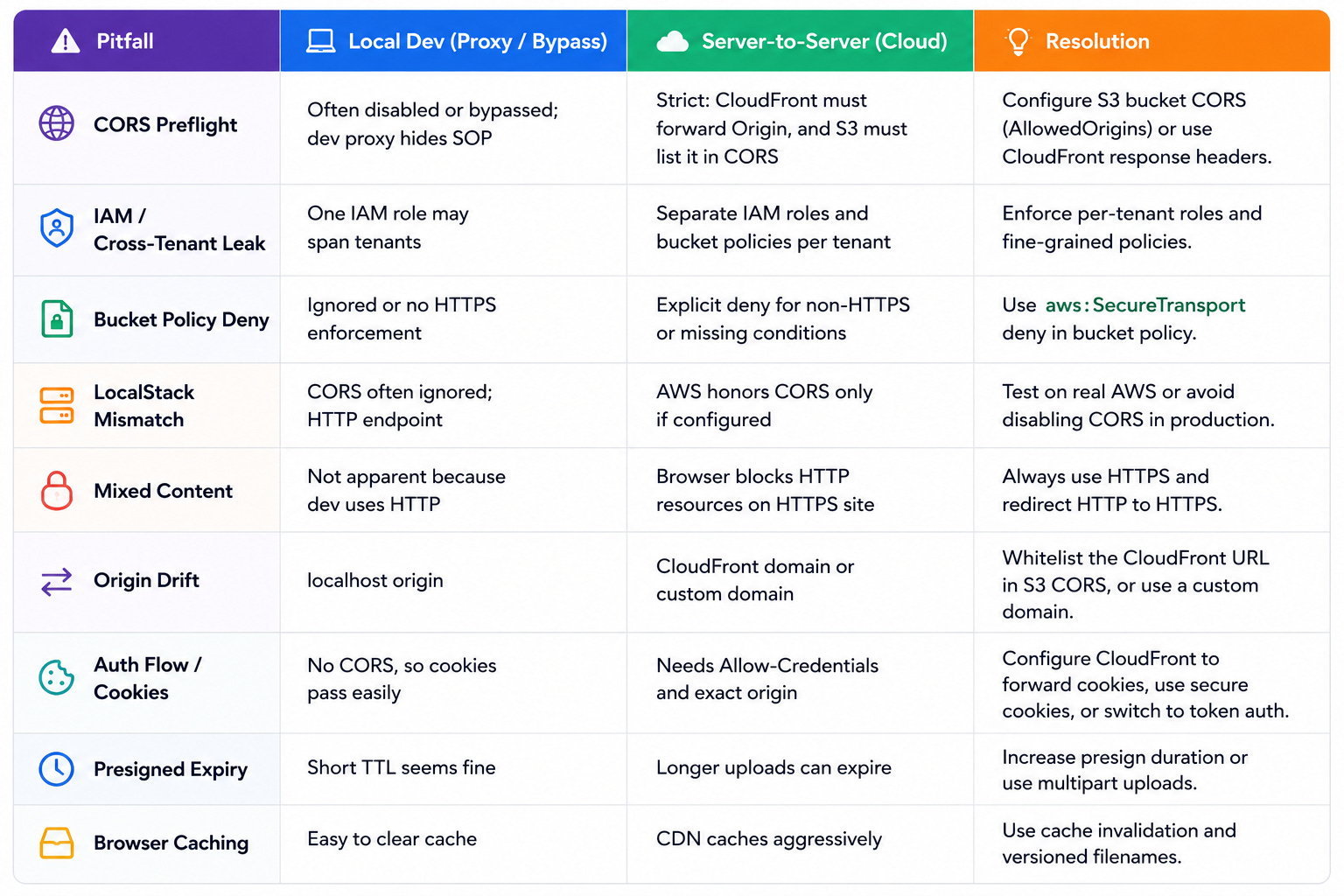
CORS Deep Dive: Browser Enforcement & Misconfigurations
CORS (Cross-Origin Resource Sharing) is an HTTP header-based protocol that lets servers whitelist allowed origins for resource sharing. Browsers enforce it like this: when a script on https://frontend.com makes a cross-domain request, the browser adds an Origin: https://frontend.com header. If the request is simple, the browser checks the response for Access-Control-Allow-Origin. If it is missing or does not match, the browser blocks the response in JavaScript and shows a console error such as “CORS request blocked.”
For non-simple requests, like PUT, custom headers, or requests with Content-Type: application/json, browsers first send a preflight OPTIONS request with Origin and Access-Control-Request-Method/Headers. The server must return the correct Access-Control-Allow-* headers. If the preflight fails, the browser aborts without sending the real request.
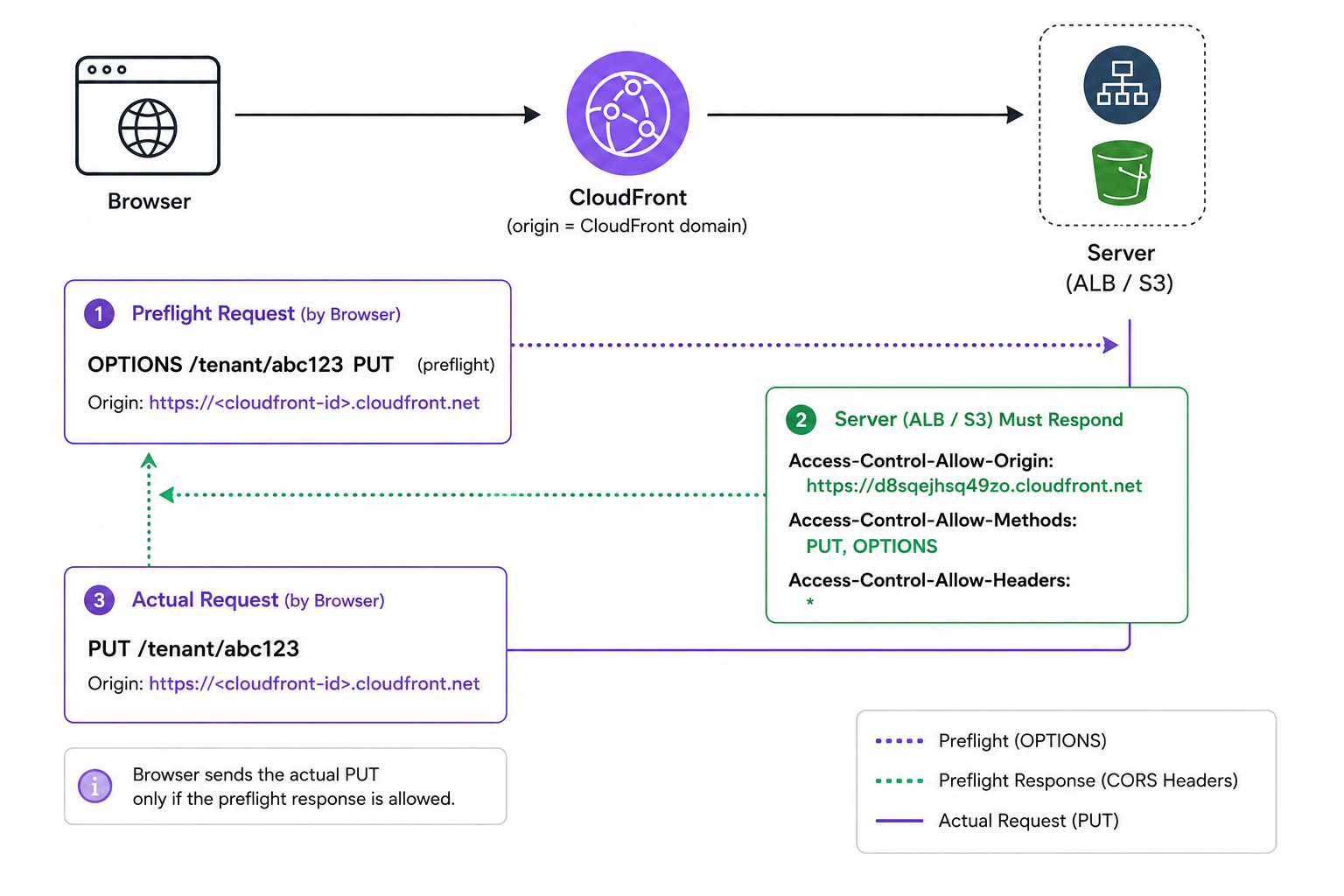
A missing or mismatched header causes CORS errors that are often hard to debug. Because the browser hides details for security, the console often gives only a generic block message, so I need to inspect the network tab or devtools to see the headers.
Key Headers and Rules
Access-Control-Allow-Origin: Specifies which origin or origins are allowed. It cannot be
*ifAccess-Control-Allow-Credentials: trueis required.Access-Control-Allow-Methods: Lists which HTTP methods the server accepts. If my SPA does a
PUTbut the server only allowsGETandPOST, preflight fails.Access-Control-Allow-Headers: Lists which custom request headers, such as
Authorization, are allowed.Access-Control-Allow-Credentials: If
true, cookies or credentials can be sent. Browsers do not allow*origin when this is true.
Common Misconfigurations
Wrong Origin Whitelist: If the SPA is served at https://app.example.com but S3 CORS only includes http://localhost:3000, production will fail.
Forgetting OPTIONS Handling: Some backends only handle GET/POST and ignore OPTIONS. Preflight then returns 403 or 404.
Missing Response Headers: The resource may respond, but if it does not include CORS headers, the browser blocks it. CloudFront response headers or edge functions can help.
Credentials & Wildcards: Enabling
Access-Control-Allow-Origin: *globally and then using credentials will fail.Case or Slash Mismatch: Origins are exact strings, so protocol, port, and trailing slash matter.
Tooling Oversights: Some clients send headers that trigger preflight. JSON and
Authorizationalmost always do.
By understanding CORS this way, I can configure AWS correctly. For example, on S3 I can apply a bucket CORS configuration like this:
<CORSConfiguration>
 <CORSRule>
   <AllowedOrigin>https://d8sqejhsq49zo.cloudfront.net</AllowedOrigin>
   <AllowedMethod>GET</AllowedMethod>
   <AllowedMethod>PUT</AllowedMethod>
   <AllowedHeader>*</AllowedHeader>
   <ExposeHeader>ETag</ExposeHeader>
 </CORSRule>
</CORSConfiguration>
In practice, I whitelist the specific CloudFront or app domain in AllowedOrigins and include every method I need.
CloudFront also offers features that help with CORS. I can use a Response Header Policy that automatically adds Access-Control-Allow-Origin, or I can use a CloudFront Function to dynamically echo the Origin. The simplest pattern is still to use CloudFront + ALB with the same origin, so CORS becomes mostly unnecessary.
CloudFront + ALB Architecture: Pros & Cons
Moving the frontend to CloudFront and the API behind an ALB gives me a lot of benefits, but it also adds complexity.
What I Gain
Global Performance & Latency: CloudFront has a global edge network, and static assets can be cached at the edge. That reduces TTFB and improves performance for distant clients.
Security & Compliance: CloudFront gives me DDoS protection and a clean place to attach AWS WAF. I can also isolate the ALB inside a private VPC and allow access only from CloudFront.
Single-Origin Domain: By serving the SPA from CloudFront and routing API calls through the same CloudFront distribution or domain, I remove most CORS issues entirely.
Cost Optimisation: CloudFront can reduce outbound bandwidth costs by caching content closer to users and lowering load on the ALB and backend.
What I Trade Off
Architecture Complexity: I now manage CloudFront, Lambda@Edge or CloudFront Functions if needed, the ALB, Route 53, ACM certificates, and deployment automation.
Debug and Deploy Overhead: Changes are slower to test because I need deploys and cache invalidations.
Cache Invalidation Hassles: SPA releases can leave stale files behind unless I use hashed filenames or invalidate the right paths.
Session & Auth Handling: Cookie-based auth needs careful CloudFront forwarding rules and secure cookie settings.
Extra Hop Latency: There is an extra network hop, but cache hits usually outweigh that cost.
CDN Cost: CloudFront and related services have a cost, although caching and egress savings can offset it at scale.
High-Level Architecture Diagram
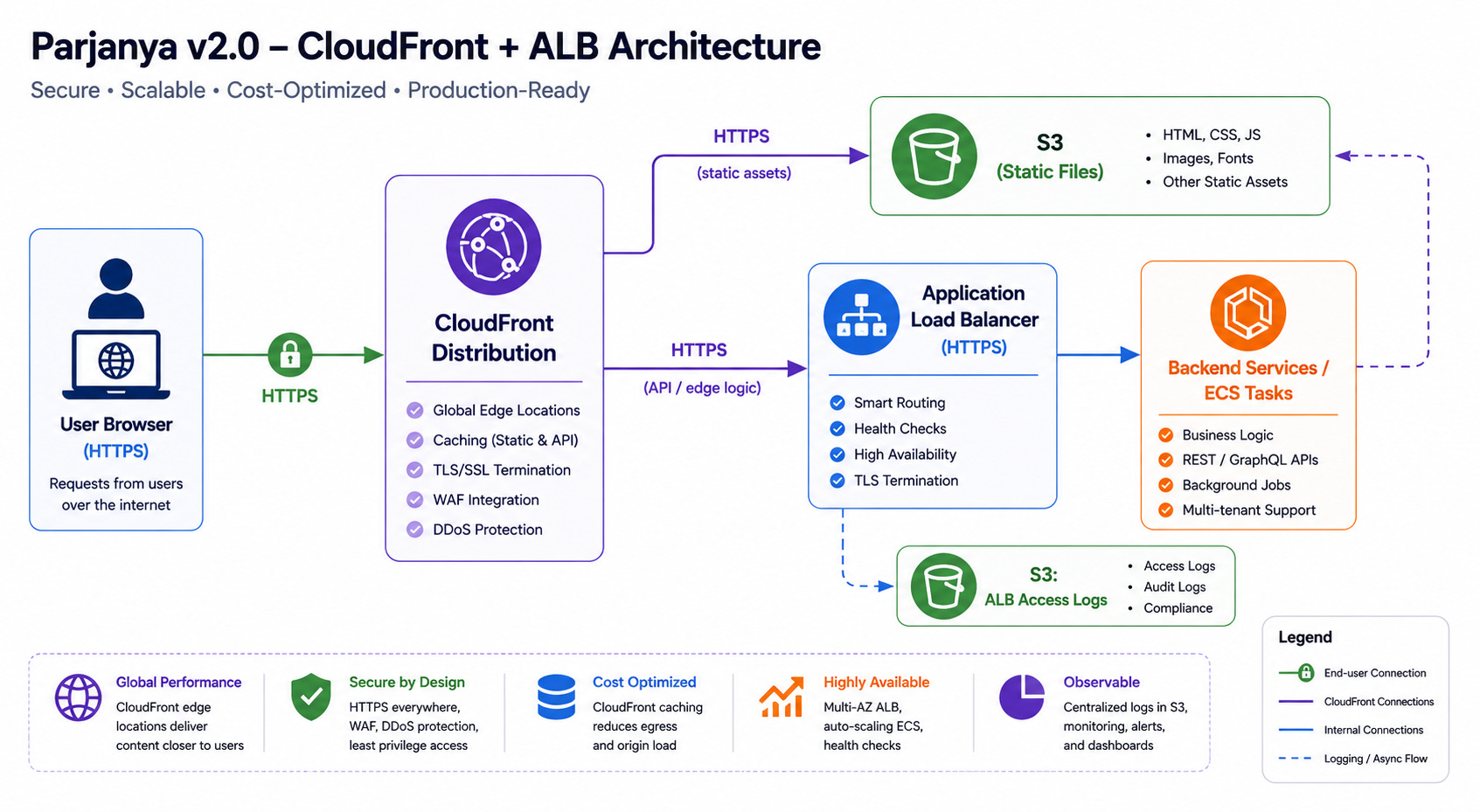
This is the architecture I want: the browser hits CloudFront, static content comes from S3 through CloudFront, and dynamic requests hit the ALB. Both S3 and ALB stay secured, and only CloudFront acts as the public entry point.
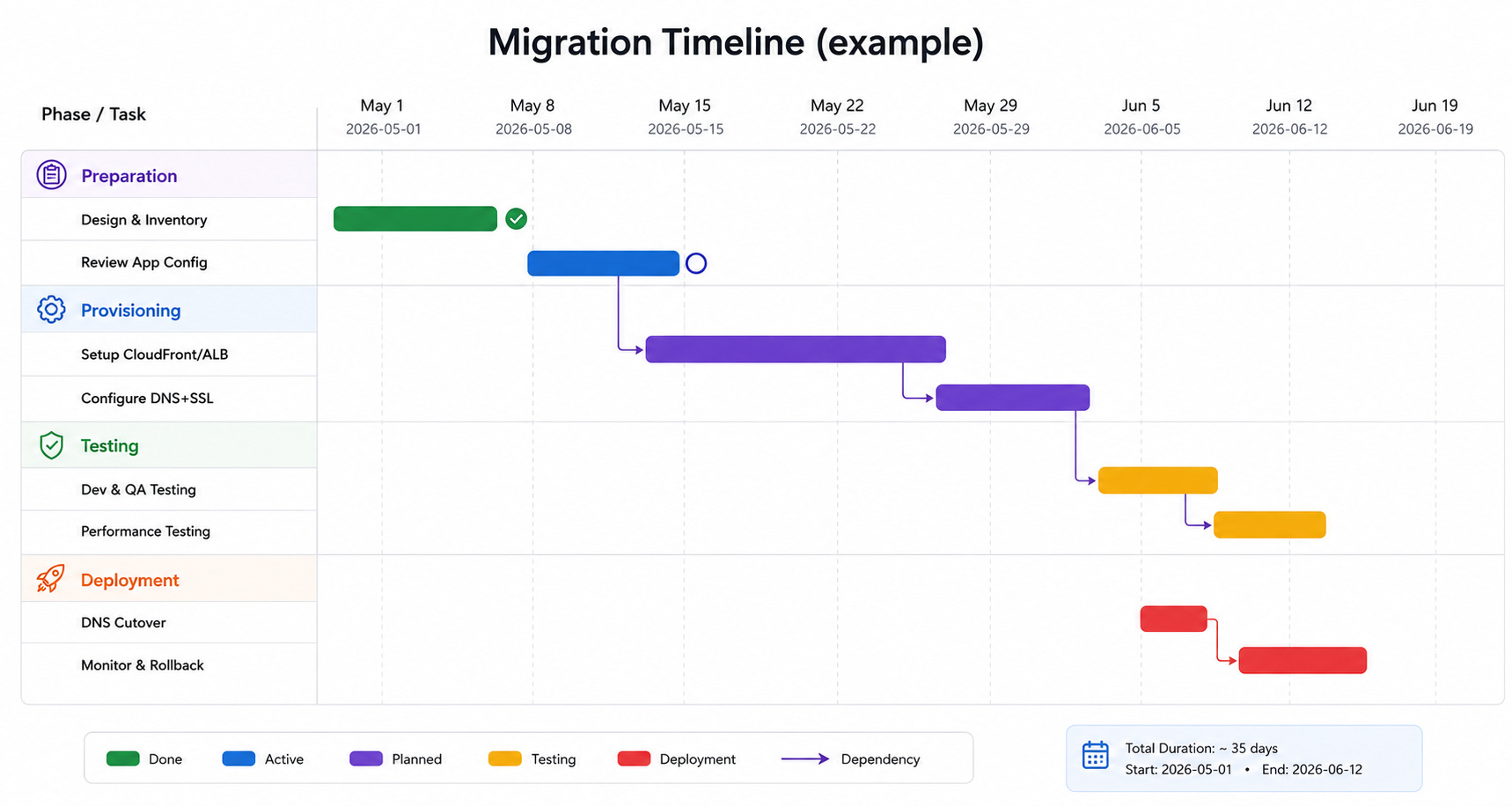
Migration Strategy & Checklist
Step 1: Preparation & Planning
I first audit the current deployment: all domains, SSL certificates, DNS records, WAF rules, IAM roles, and the existing frontend and API endpoints. Then I define the target state: a single CloudFront distribution, for example with an alternate domain like app.example.com, fronting an internal ALB and S3 origin. I also estimate the work and categorise risk so I can separate simple changes from business-critical flows.
Step 2: Provision Infrastructure
Create the CloudFront distribution. If I use Terraform, I need a
custom_origin_configfor the ALB origin so it is not treated like an S3 origin.Configure cache behavior. I point routes to the ALB origin for API calls and to S3 for static routes. I forward the
Originheader and the relevant CORS headers so the origin sees them.Set up TLS certificates. I use ACM for the frontend domain and attach the certificate to CloudFront. The ALB also needs HTTPS.
Restrict ALB access. I create a security group that allows inbound 443 only from CloudFront IP ranges or a trusted origin header setup.
Configure S3 CORS and bucket policy. I allow my frontend domain and enforce HTTPS via
aws:SecureTransport.Update CI/CD. After uploading SPA artifacts to S3, I trigger a CloudFront invalidation for the changed paths.
Step 3: Testing & Validation
Smoke tests in staging: I point a test domain to the new distribution and verify that static assets, API calls, and auth flows work.
Performance and security verification: I check cache hit ratios, enable WAF metrics if used, and confirm that direct access to the old ALB is blocked.
Staged DNS cutover: I move traffic gradually using Route 53 weighted records or a similar approach.
Step 4: Full Cutover and Rollback Plan
Once I am confident, I point the production app domain to CloudFront. I keep rollback simple by preserving the old config and having a direct path back to the ALB if needed. Because the ALB is restricted to CloudFront traffic, rollback needs to be planned carefully.
Code & Config Snippets
Amazon S3 Bucket CORS (example JSON)
{
  "CORSRules": [
    {
      "AllowedOrigins": ["https://your.frontend.domain"],
      "AllowedMethods": ["GET", "PUT", "POST", "DELETE", "HEAD"],
      "AllowedHeaders": ["*"],
      "ExposeHeaders": ["ETag", "x-amz-version-id"],
      "MaxAgeSeconds": 3600
    }
  ]
}
Terraform: AWS CloudFront Distribution (ALB origin)
resource "aws_cloudfront_distribution" "cdn" {
  origin {
    domain_name = aws_lb.api.dns_name
    origin_id   = "api-origin"
    custom_origin_config {
      http_port              = 80
      https_port             = 443
      origin_protocol_policy = "https-only"
      origin_ssl_protocols   = ["TLSv1.2"]
    }
  }

  default_cache_behavior {
    target_origin_id         = "api-origin"
    viewer_protocol_policy   = "redirect-to-https"
    forwarded_values {
      headers = ["Origin", "Access-Control-Request-Method", "Access-Control-Request-Headers"]
      cookies { forward = "all" }
      query_string = true
    }
    allowed_methods = ["DELETE", "GET", "HEAD", "OPTIONS", "PATCH", "POST", "PUT"]
    cached_methods  = ["GET", "HEAD"]
  }

  viewer_certificate {
    acm_certificate_arn      = aws_acm_certificate.certificate.arn
    ssl_support_method       = "sni-only"
    minimum_protocol_version = "TLSv1.2_2021"
  }
}
NGINX Reverse Proxy (Dev Example)
server {
  listen      8001;
  server_name localhost;
  location / {
    proxy_pass http://127.0.0.1:3000;
  }
  location /api/ {
    proxy_pass http://127.0.0.1:8080/;
  }
}
CloudFront Function (or Lambda@Edge) to Add CORS
async function handler(event) {
  var request = event.request;
  var response = event.response;
  if (request.headers.origin && !response.headers['access-control-allow-origin']) {
    response.headers['access-control-allow-origin'] = { value: request.headers.origin.value };
  }
  return response;
}
Sample IAM Policy (Bucket HTTPS Enforce)
{
  "Version": "2012-10-17",
  "Statement": [{
    "Sid": "RequireTLS",
    "Effect": "Deny",
    "Principal": "*",
    "Action": "s3:*",
    "Resource": ["arn:aws:s3:::my-bucket", "arn:aws:s3:::my-bucket/*"],
    "Condition": {"Bool": {"aws:SecureTransport": "false"}}
  }]
}
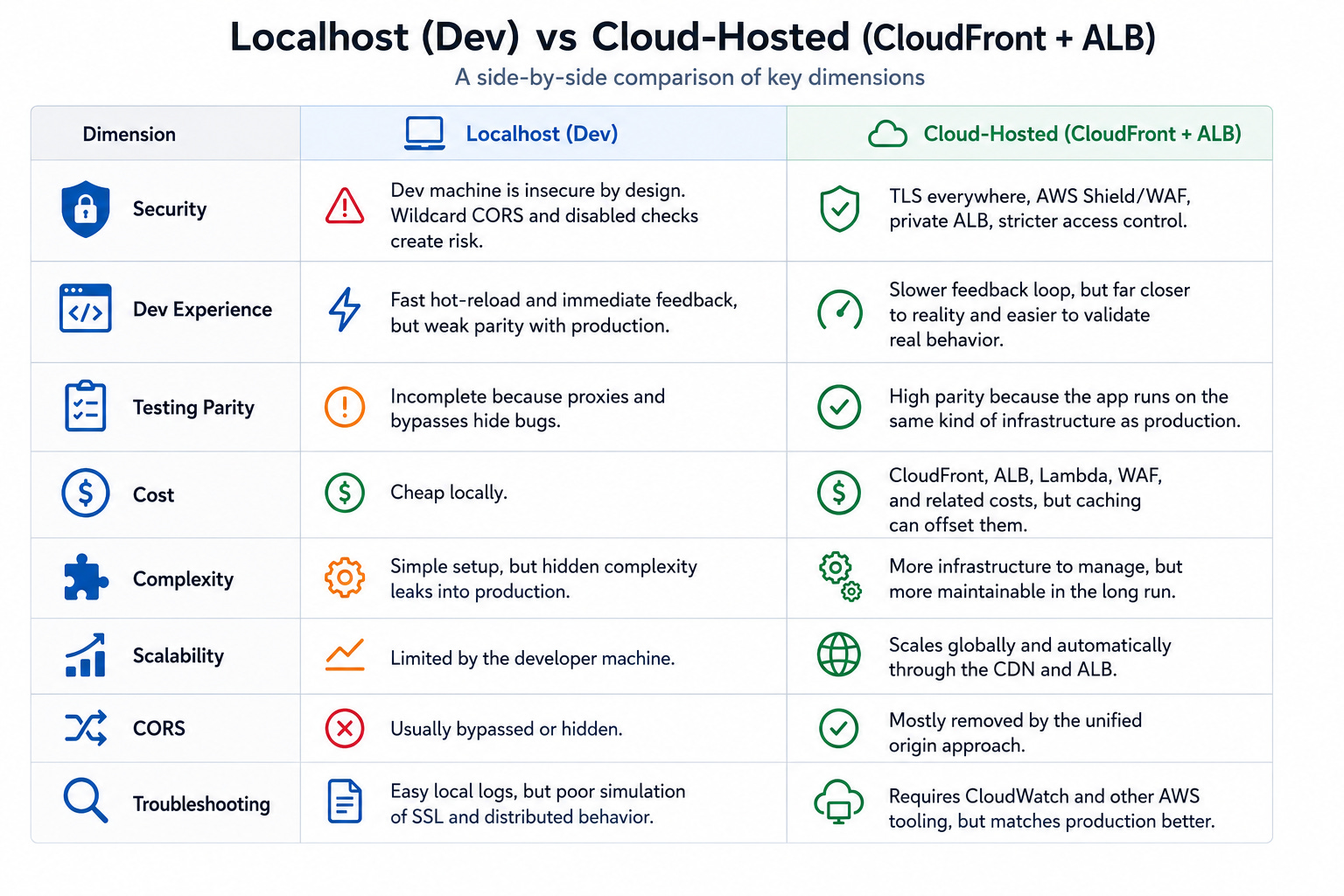
Localhost vs Cloud-Hosted Frontend
Monitoring, Logging & Testing Tools
Once the system is live, I want to rely on:
Metrics & Logs: CloudWatch metrics for CloudFront and ALB, plus access logs.
Real-User Monitoring: CloudWatch RUM for client-side metrics and errors.
Tracing: AWS X-Ray if the backend is complex.
Error Tracking: A frontend JS error reporter such as Sentry.
Testing Tools: Postman or
curlwith anOriginheader for CORS validation, and load tools like Apache Bench or JMeter for performance testing.
Community Insights & References
AWS Official Guidance
Optimizing application performance: CloudFront + ALB strategic benefits
Covers CloudFront in front of ALB, performance improvements, origin protection, and migration considerations.Introducing Amazon CloudFront VPC Origins
Explains private VPC origins, CloudFront-to-private-ALB architecture, and stronger origin isolation.Restrict access to Application Load Balancers from CloudFront only
AWS guidance for protecting ALB origins using CloudFront custom headers and origin restrictions.CORS configuration through Amazon CloudFront
Deep dive into forwarding CORS headers, OPTIONS caching, and CloudFront cache/origin request policies.Accelerate and protect dynamic workloads with CloudFront
Focuses on performance, persistent connections, and origin offload for dynamic applications.
MDN Documentation
MDN — Cross-Origin Resource Sharing (CORS) Guide
The foundational browser-side explanation of CORS, preflight requests, and browser enforcement.MDN — CORS Errors Guide
Excellent debugging reference for interpreting browser CORS failures.MDN — Access-Control-Allow-Origin Header
Detailed explanation of the most important CORS response header.MDN — Practical CORS Configuration Guide
Security-oriented implementation guidance for configuring CORS correctly.MDN — CORS Glossary
Concise overview of same-origin policy and cross-origin access.
AWS Documentation
Amazon S3 — Using CORS
Official S3 documentation for configuring and understanding CORS.Amazon S3 — Troubleshooting CORS
Extremely useful for diagnosing 403s, AllowedOrigins mismatches, and missing methods.Amazon S3 — Configuring CORS Examples
Shows JSON examples for S3 bucket CORS policies.Amazon S3 — Elements of a CORS Configuration
Detailed breakdown of AllowedOrigins, AllowedMethods, AllowedHeaders, etc.AWS re:Post — Resolve “No Access-Control-Allow-Origin” errors in CloudFront
Useful troubleshooting walkthrough for CloudFront + CORS setups.AWS re:Post — Configure and confirm CORS in Amazon S3
Practical debugging examples using curl and OPTIONS preflight checks.
Community Q&A
Stack Overflow — S3 Access-Control-Allow-Origin Header discussion
One of the classic threads on S3 CORS response handling.Stack Overflow — S3 not returning Access-Control-Allow-Origin headers
Useful troubleshooting thread for bucket/object-level CORS confusion.Express.js CORS Middleware Docs
Good explanation of browser-enforced CORS vs server-side behavior.AWS re:Post — Intermittent CORS errors even with Allow-Origin configured
Helpful for understanding cache and header propagation edge cases.
Case Study Blogs & Practical Guides
StormIT — CloudFront Distribution for EC2 & ALB
Practical CloudFront + ALB deployment walkthrough.Using AWS CloudFront to improve performance, security & availability
Covers caching, origin groups, availability, and performance patterns.Handling CORS Issues in Amazon S3
Community-written debugging guide with real-world examples.Adding a CORS Policy to an S3 Bucket
Lightweight and practical S3 bucket CORS reference.Prepare and run performance tests for CloudFront using RUM
Great reference for validating CloudFront improvements in production.
Closing Thought
What I learned is simple: localhost is great for speed, but it is not production. If I want fewer surprises, fewer CORS headaches, and better security, I need to design the frontend and backend like they will live in production from the beginning.
