
When I started working on the performance of Parjanya’s AI analysis, I thought I was looking at a fairly straightforward infrastructure problem.
The GPUs were taking too long to start.
Fix the startup time, make the model faster, and the problem would be solved.
It turned out to be much more interesting than that.
Over the past two months, I ended up digging through cold starts, GPU behaviour, model loading, storage bottlenecks, inference paths, numerical differences between GPUs, and even the way a tiny change in floating-point computation can alter a photographic verdict.
More importantly, it reminded me of something I have learned repeatedly while building products:
The hardest engineering problems are often not the ones that look technically complicated. They are the ones where speed, cost, correctness and user experience collide.
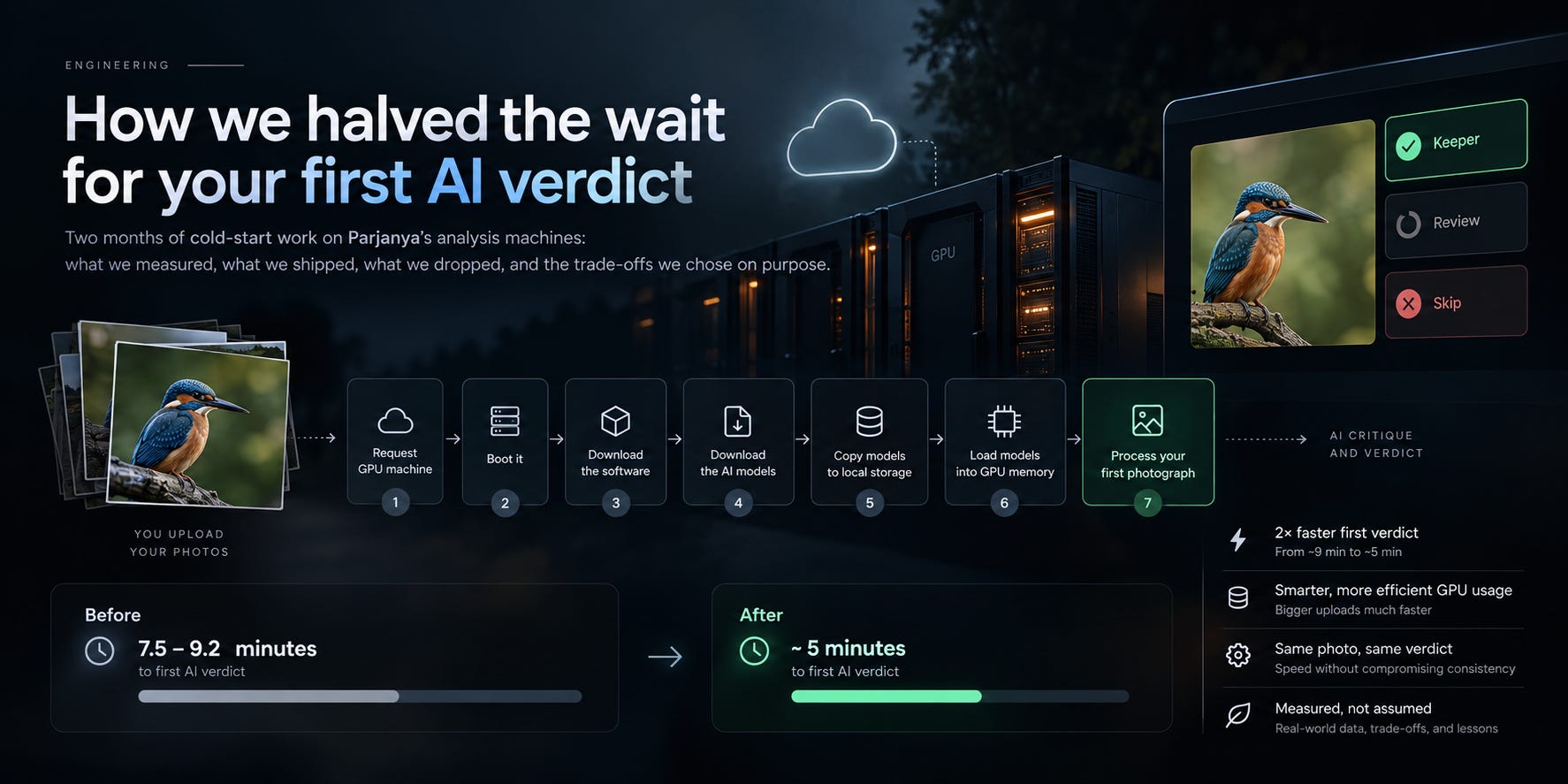
This is the story of how we brought Parjanya’s first AI verdict from roughly 7.5–9.2 minutes down to about 5 minutes, while keeping the system affordable and, more importantly, keeping the verdicts stable.
First, what actually happens when you upload photographs?
When you upload a shoot to Parjanya, two things happen.

First, a quick technical check runs immediately.
Then each photograph goes to a GPU machine running our vision-language model. That model produces the critique, identifies areas for improvement, and eventually gives the photograph a Keeper / Review / Skip verdict.
The interesting part is that those GPU machines aren’t running all the time.
When we say average of 18,000+ images processed in a week or two it is definitely not guaranteed that 1200+ images per day, perhaps, it is quite possible that 80-90% traffic across tenants on a single or two to three days
At our current scale, keeping GPUs running continuously would mean paying for machines that spend most of their time doing nothing.
So we turn them off when there is no work.
That gives us a very attractive infrastructure cost profile — but introduces a cold start.
When your upload arrives and nothing is running, we have to:
Request a GPU machine.
Boot it.
Download the software.
Download the AI models.
Copy the models to local storage.
Load the models into GPU memory.
Process your first photograph.

At the end of July, that entire journey could take up to nine minutes.
For someone trying Parjanya for the first time, nine minutes doesn’t feel like “AI infrastructure is warming up.”
It feels like the product is broken.
That was the problem I wanted to solve.
The numbers before and after
Here is what we measured.
Note: The 27 September numbers are from single cold starts; I’ll keep measuring this as more real-world uploads arrive. But getting there wasn’t one optimisation.
It was a series of relatively small discoveries.
And the first discovery was perhaps the most embarrassing one.
1. I couldn’t optimise what I wasn’t measuring
The first thing I discovered was that roughly four minutes of every cold start wasn’t being measured at all.
Our logs started measuring the model’s work only after the machine had already:
booted,
downloaded the software,
copied the model,
and reached the point where inference could begin.
Everything before that was invisible.
There was another problem.
Our machine logs were identified using network addresses.
Those addresses get reused.
So when multiple machines started around the same time, it wasn’t always possible to tell which log belonged to which machine.
In other words, I was trying to optimise a system without having a reliable stopwatch.
So the first optimisation was not an optimisation at all.
We changed the observability.
Every machine now has a unique identity in the logs, and the boot process records timestamps for every major stage — from “machine running” all the way to “model loaded.”
And I changed another rule internally:
A performance change doesn’t get a tick simply because the code was merged. It gets a tick only after it is deployed and measured in the Production.
That sounds obvious.
In practice, it changes how you work.
2. Wake the GPU when the work arrives
The next surprise was the queue.
Our machines were being started based on the length of the work queue.
That sounds sensible.
It wasn’t fast.
The queue publishes its length periodically. Another mechanism checks that number periodically. Only then does the system decide that it needs another machine.
We measured the delay.
2 minutes 44 seconds.
Before the GPU had even started doing anything, almost three minutes had disappeared.
So we changed the trigger.
The same operation that puts the photograph into the queue now directly requests a machine.
On the first cold start after that change, the machine was requested 15 seconds after the first photograph arrived.
That was a much more direct relationship:
Work arrived → ask for compute.
We also changed how many machines we started.
Previously, the system essentially reacted to “is anything waiting?”
That meant a 13-photo upload could potentially wake every available machine.
Now the fleet sizes itself against the backlog.
Small upload? One or two machines.
Large upload? More machines.
That change brought a large batch from around 69 minutes to about 4 minutes.
I call this queue-aware scaling
3. If two things don’t depend on each other, why run them sequentially?
A new machine needs to download two large things:
our analysis software — roughly a 5 GB container image
the model weights
Previously, these happened one after another.
There was no real dependency between them.
So we made them happen simultaneously.
The machine now waits for both operations to complete before loading the model.
That saved approximately 110 seconds on each of the two machines we measured.
There is a small engineering detail here that I think is worth mentioning.
Once you start overlapping operations, measurement becomes harder.
If you only record the end time, you lose the ability to understand where the time actually went.
So we record the beginning and end of each stage.
That way, when operations overlap, we can still reconstruct the timeline.
And if a download fails, the machine stops cleanly rather than continuing with a half-ready environment.
Fast is useful.
Fast and observable is much more useful.
4. The fastest download tool couldn’t solve a disk bottleneck
By mid-September, we had reached another bottleneck.
Model copying had become the slowest part of the boot.
The obvious idea was:
Can we download it faster?
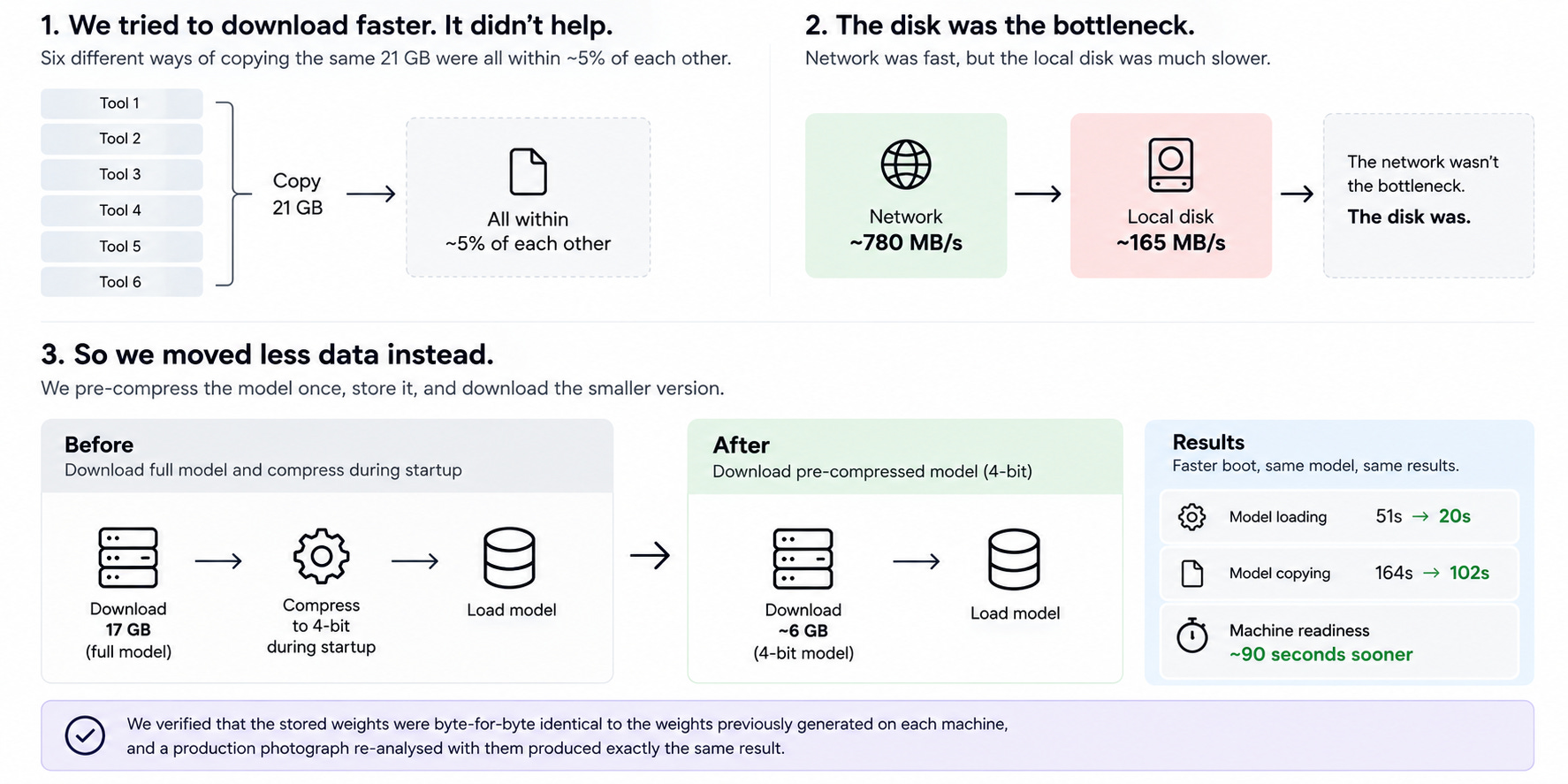
So we tried six different ways of copying the same 21 GB.
The result?
They were all within about 5% of one another.
That was the clue.
We separated network performance from disk performance.
The network could deliver around 780 MB/s.
The local disk could write only around 165 MB/s.
The network wasn’t the bottleneck.
The disk was.
That meant no amount of cleverness in the download tool was going to solve the fundamental problem.
So we asked a different question:
Can we move less data?
That worked.
Our main model runs in a compressed 4-bit representation.
Previously, every machine downloaded the full 17 GB model and compressed it during startup.
Instead, we now compress it once, store the compressed version, and download approximately 6 GB.
That changed:
model loading: 51s → 20s
copying: 164s → 102s
machine readiness: approximately 90 seconds sooner
We also verified something that mattered enormously to me:
The stored weights were byte-for-byte identical to the weights each machine previously generated for itself.
And a production photograph re-analysed with them produced exactly the same result.
This was a good reminder of a general optimisation principle:
When the disk is the bottleneck, reducing bytes can be more valuable than making the pipe faster.
5. Then I started looking inside the model
Once the infrastructure was reasonably healthy, I turned to the actual photo analysis.
Parjanya currently uses two GPU types:
NVIDIA T4 — older, cheaper
NVIDIA A10G — newer, faster
A photograph took roughly 106 seconds on a T4.
So we profiled the model layer by layer.
The first major discovery was a particular operation that cuts the photograph into small patches for the model to process.
That single layer was taking around 31 seconds.
The T4 doesn’t have hardware support for the number format that layer was using — bfloat16 — so it was falling back to a very slow path.
Running that layer in standard 32-bit precision took only milliseconds.
That brought the photo from roughly:
106 seconds → 75 seconds
Then we found another optimisation in the attention mechanism.
Switching the language part of the model to a simpler attention implementation brought the photo down to around:
56 seconds
Our first production T4 run measured 65 seconds from start to finish.
At this point, it looked like a straightforward win.
And then things became much more interesting.
6. Faster didn’t necessarily mean the same answer
This was the part I didn’t expect.
The speed improvements changed numerical behaviour.
Not dramatically.
Not obviously.
But enough.
In the first optimisation, only 527 out of 3.7 million values moved by the smallest step representable by the format.
That sounds insignificant.
For most photographs, it was.
But for photographs sitting close to a decision boundary, it could change the final verdict.
So we did something that became one of the most important experiments in this entire exercise.
We ran the same photographs through both GPU types.
Each GPU was perfectly repeatable.
Same photograph.
Same GPU.
Same answer.
Every time.
But the two GPUs did not always agree with each other.
Across 64 varied production photographs, they agreed on 45.
And 15 photographs received a Keeper on one GPU and Skip on the other.
That changed how I thought about performance optimisation.
The question wasn’t:
“Did the model get faster?”
It became:
“Did the model get faster while preserving the thing the user actually cares about?”
In our case, that thing isn’t milliseconds.
It’s the verdict.
7. We chose consistency over raw speed
That led us to three decisions.
First: stability before speed
Across 159 photographs, the faster T4 path agreed with the A10G about as often as the old T4 path did:
122 vs 125.
Within the noise of the experiment, speed hadn’t meaningfully damaged consistency.
That gave us confidence to keep the optimisation.
Second: prefer one GPU type for new work
We now start T4 machines first and use the A10G only when a T4 isn’t available.
Since August, T4 launches succeeded 47 out of 48 times.
That means almost every new photograph is now analysed on the same class of GPU.
Third: make the curation rule less sensitive to a single tone issue
Our curation layer turns model findings into the final verdict.
We found that a single severe tone-related issue — exposure, dynamic range or noise — was one of the places where the GPU differences mattered most.
So we changed the rule:
A single severe tone problem by itself now counts as moderate rather than immediately sending the photograph to Skip.
Importantly, we didn’t rewrite history.
Photographs analysed before these changes retain the verdict they were given.
The new rules apply to new analyses.
That is deliberate.
If someone has already acted on a verdict, silently changing it underneath them isn’t something I want to do.
8. Some of the best engineering decisions were the things we didn’t ship
One of my favourite parts of this exercise is not actually the list of things we improved.
It is the list of things we tried, measured, and deliberately decided not to ship.
That distinction matters.
When you’re building a product, especially one involving AI infrastructure, it is very easy to fall into a particular pattern:
“This technology is faster, therefore we should use it.”
Or:
“This optimisation is supposed to help, therefore let’s implement it.”
But an engineering optimisation is only useful if it improves the system under our actual constraints.
For Parjanya, those constraints aren’t just latency.
We also care about:
GPU cost
availability
reliability
consistency of AI verdicts
privacy of photographers’ work
operational complexity
and whether an improvement is actually meaningful to the person using the product
That led to several experiments that ended with a very satisfying outcome:
We didn’t ship them.
Here are some of them.
1. “Can we just download the model faster?”
This was the most obvious idea when model copying became the slowest part of the boot.
We were moving a lot of data, so the natural assumption was:
If downloading is slow, find a faster way to download.
So we tried six different approaches to copying the same 21 GB.
The result was surprisingly boring.
All six were within roughly 5% of one another.
At first, that was frustrating.
Then it became useful.
We separated the network from the local disk and measured both independently.
The network could deliver approximately 780 MB/s.
The local disk could write only around 165 MB/s.
That made the bottleneck obvious.
The network was capable of delivering data much faster than the machine could actually write it.
So changing the download tool wasn’t going to solve the problem.
We could spend days making the network path more sophisticated and still be limited by the disk.
The lesson was simple:
Before optimising a pipeline, find the slowest component in the pipeline.
In our case, the answer wasn’t “download faster.”
It was:
Move less data.
That led to the pre-compressed 4-bit model and saved roughly 90 seconds of machine startup.
2. “What if we put the software image on the fast disk too?”
Once we discovered that the local disk was the bottleneck, another idea naturally came up.
The machine has a fast local disk.
Why not put more of the boot assets there?
The problem was that the fast disk was already doing the work of receiving and storing the model.
Adding the software image would mean more data being written to the same bottleneck.
In other words, we would have been trying to fix a traffic jam by adding more cars to the road.
There was also another subtle point.
Moving the software image to the fast disk could improve one stage while making another stage slower because of the additional writes.
So we decided against it.
This is a useful pattern in performance engineering:
A faster component doesn’t automatically make every workload faster.
Sometimes the right optimisation is to reduce the amount of work that reaches the fast component in the first place.
3. “Can we load both models at the same time?”
Parjanya uses more than one model during the analysis process.
So another obvious question was:
If we load them sequentially today, can we load them simultaneously?
Normally, parallelising independent work is a good optimisation.
And we did test it.
But by the time we had already pre-compressed the main model, the combined loading time of the two models had fallen to roughly 22 seconds.
At that point, parallelising them didn’t leave us much to win.
This is an important distinction between a technically valid optimisation and a worthwhile optimisation.
Yes, we could make two operations overlap.
But if the total time we’re trying to eliminate is already small, the complexity isn’t justified.
So we left it alone.
Not every measurable optimisation is worth implementing.
4. “Should we warm up the model with a fake photograph?”
This one came from an observation that initially looked quite convincing.
We thought the first photograph processed by a newly started GPU might be dramatically slower than the photographs that followed.
If that were true, we could start the machine, process a dummy photograph, throw away the result, and then give the user the “real” warmed-up inference.
It sounded reasonable.
So we measured it properly.
The result?
The first photograph on the same GPU type was at most around 12 seconds slower than subsequent photographs.
That wasn’t remotely large enough to justify processing an extra photograph every time a machine started.
And there is a deeper reason why this matters.
A cold start already happens because a real photograph is waiting.
If we process a fake photograph first, we haven’t eliminated the work.
We’ve simply moved it earlier in the sequence.
So instead of:
Start → analyse user’s photo
we would have:
Start → analyse fake photo → analyse user’s photo
The user would still be waiting.
We decided not to do it.
This was a good reminder that sometimes the best optimisation is recognising that a cost cannot actually be removed — only moved around.
5. “Can we cache the fixed part of the prompt?”
This one looked much more promising.
Every photograph we send to the model comes with a fairly long set of instructions.
Most of those instructions are identical from photograph to photograph.
That immediately suggests caching.
If the instructions don’t change, why make the model process them repeatedly?
So we investigated it.
The surprise was where the time was actually going.
Only around 490 tokens come before the photograph in the current prompt structure.
That’s roughly a second of work.
The much larger component we had mentally categorised as “prompt processing” was actually the vision side of the model processing the photograph.
So caching the fixed text wasn’t going to give us the large improvement we had imagined.
There was another complication: separating and computing that part independently changed the model outputs.
So we would have been taking on additional complexity and potentially changing verdict behaviour for a relatively small performance gain.
We didn’t ship it.
However, this investigation did reveal a more interesting possibility.
If we reorder the instructions so that the reusable part comes before the photograph, a much larger portion of the prompt could potentially become cacheable.
That is now a separate future experiment.
And, like every model optimisation we’re considering, it will have to pass the same verdict-consistency tests before it goes anywhere near production.
6. “What about FlashAttention 2?”
If you’ve spent any time optimising transformer inference, FlashAttention is an obvious thing to investigate.
We did.
The problem was much simpler than benchmarking:
It doesn’t run on the T4.
Our infrastructure deliberately uses the T4 because it is cheaper and generally available for our workload.
So an optimisation that requires hardware we aren’t primarily running on isn’t really an optimisation for Parjanya.
It might be a useful path if our hardware strategy changes.
For the current system, it isn’t.
7. “Why don’t we just run everything on the faster A10G?”
This is probably the most tempting option.
The A10G is faster.
If the goal is simply to reduce inference time, why not use it everywhere?
Because the GPU isn’t free.
The A10G costs more per photo.
It is also harder to obtain consistently.
In one of our three zones, it isn’t offered at all.
And in 3 of 54 recent scale-ups, an A10G wasn’t available in any zone.
So we would be paying more for a resource that isn’t always available, while our cheaper T4 machines were giving us sufficiently good performance and, importantly, consistent verdicts.
There is also a product consideration here.
A photograph isn’t just a unit of GPU work.
It is someone’s photograph.
If changing hardware can change a borderline Keeper / Review / Skip decision, then “faster GPU” isn’t automatically better.
For our current workload, the T4 gives us a combination of:
reasonable inference time + lower cost + much better availability + predictable behaviour.
That’s a trade-off we’re comfortable with today.
It may not be the right trade-off forever.
The pattern behind all these decisions
Looking back, there is a common thread in almost every experiment we abandoned.
We started with a plausible hypothesis.
Then we measured it.
Sometimes the measurement disproved the hypothesis.
Sometimes the improvement was real but too small.
Sometimes the improvement solved one problem while making another worse.
And sometimes the technology simply didn’t fit our actual infrastructure.
That is why I increasingly think of optimisation as a constraint-solving exercise, rather than a race to make a benchmark number smaller.
For example:
And that leads to perhaps my favourite lesson from this entire exercise:
An optimisation isn’t valuable simply because it makes something faster.
It is valuable when it improves the product without creating a worse trade-off somewhere else.
For a developer, that might mean not introducing complexity for a 2% gain.
For a founder, it might mean not doubling infrastructure costs to shave a few seconds off a workflow that users don’t actually care about.
And for a photographer using the product, it might mean accepting a slightly slower GPU if that gives us a more consistent verdict and lets us keep the economics sustainable.
The engineering work is therefore not simply:
Make it faster.
It is:
Make the right thing faster, at the right cost, without compromising what the product is supposed to do.
That distinction has probably been the most valuable outcome of this entire cold-start exercise.
9. Why aren’t we just keeping a GPU warm?
This is probably the obvious question.
If cold starts are the problem, why not simply keep a GPU running?
Because infrastructure economics matter.
Today, Parjanya sees well under one cold start per day.
Most uploads are batches, which means hundreds of photographs (sometimes 500-1000 batches and multiple users) can share the cost of a single cold start.
Keeping a GPU running 24×7 to eliminate a wait that happens occasionally isn’t obviously a better product decision.
There are several possible versions of a warm pool:
Stopped pool
Boot machines once, put the software and models on them, then stop them.
Starting one should take roughly 1.5–2.5 minutes rather than around four.
Warm during working hours
Keep one machine running during defined hours.
Always on
Keep one GPU running continuously.
Then the first verdict would mostly be limited to inference time — around a minute on a T4.
The last option is obviously the most expensive.
So we haven’t done it.
Yet.
What would change my mind?
Several cold starts per day.
Several accounts uploading regularly.
Faster user growth.
Users abandoning the product after their first upload.
Or a product promise that requires a genuinely fast first result.
In other words:
The right infrastructure architecture depends on the workload, not on what looks technically elegant.
10. There are bigger optimisations ahead
The current work made the infrastructure we already have faster.
The next improvements require more fundamental changes.
One possibility is reordering the model instructions so that the reusable portion can be cached.
Today, much of the prompt comes after the photograph.
Because the photograph changes every time, the model cannot simply reuse everything.
Moving the stable instructions before the photograph could make much more of them cacheable.
But this needs to be tested carefully.
Even tiny numerical changes can move borderline verdicts.
So we would run the same verdict-agreement tests before shipping it.
What about vLLM?
Another possibility is moving from the standard Python model runtime to a dedicated serving engine such as vLLM.
These systems are designed to make better use of GPUs by:
interleaving requests,
managing model memory,
caching repeated prompt text,
and improving throughput.
It is tempting to assume that this will automatically make Parjanya dramatically faster.
I don’t.
Our machines already analyse roughly one photograph per minute, and we overlap fetching the next photograph with analysing the current one.
So I expect a potential double-digit percentage improvement in photos per hour, rather than some magical 10× transformation.
Before adopting it, I’d want to prove five things:
Our exact vision-language model works correctly.
The 4-bit weights work correctly.
Throughput improves on identical photographs.
Verdicts remain consistent.
Cold-start time doesn’t get worse.
The last one is particularly important.
A serving engine that makes inference faster but makes startup slower might not actually improve the experience.
11. And what about a hosted AI API?
This is another obvious architectural option.
Send the photograph to a hosted model API.
No GPU cold starts.
No idle machines.
No GPU fleet management.
From a purely operational perspective, that sounds attractive.
But there is another consideration that matters much more for Parjanya.
Photographers upload real work.
A lot of it is unpublished client work.
Sometimes it is work covered by contractual obligations.
So “processed on infrastructure we control” is not merely an infrastructure preference for us.
It is part of the product promise.
A hosted API would mean sending photographs to another company.
That makes data handling the first question, not performance.
Even if that question were resolved, there are other trade-offs:
per-call costs grow with volume,
external outages become part of our pipeline,
rate limits become another dependency,
and a provider could change its model and potentially change verdicts.
I can see a hosted model eventually playing a role as a fallback for bursts or GPU shortages.
But I don’t see it replacing the infrastructure we control without a much stronger reason.
12. The less glamorous work underneath all of this
There is also some groundwork we need before those bigger architectural changes become easy.
Today, the analysis code builds the model directly.
I’d rather have a clean interface:
photograph + instructions → structured analysis
Then today’s model becomes one backend.
A future serving engine becomes another.
A hosted API becomes another.
And we can run the same photographs through two backends and compare their verdicts.
Because for Parjanya, the backend is not the product.
The verdict is the product.
So a backend doesn’t get shipped simply because its benchmark is faster.
It has to preserve the behaviour that users depend on.
What I learned from this
After spending two months inside this problem, these are the lessons I am taking away.
1. Measure before optimising
The “mysterious four minutes” wasn’t mysterious.
We simply weren’t measuring it.
A proper boot profile answered the question in a day.
2. Make every optimisation explain itself in numbers
Twice, a number that initially looked like a regression or an opportunity turned out to be a mixture of different GPU types.
We now compare before and after on the same hardware.
3. Be willing to correct yourself publicly
One of our early figures claimed 221 seconds saved.
It was wrong.
We had omitted a stage that had become slower.
The actual saving was 132 seconds.
We corrected the number.
I think that’s an important part of building in public.
The point isn’t to always have the right answer.
It’s to make the process visible enough that you can correct the wrong one.
4. When the disk is the bottleneck, move less data
We tried faster ways to move data.
The better solution was to have less data to move.
5. Test the actual production system
One version of our attention optimisation accidentally changed the vision part of the model as well, because of how the model library propagated configuration settings.
Our tests passed.
A short startup census caught the mistake on the first development boot.
We then added a guard that prevents the model from starting if any component unexpectedly falls back to the CPU.
That kind of defensive engineering isn’t glamorous.
But it is the difference between a benchmark and a reliable system.
6. Speed and correctness are connected
This was probably the biggest lesson.
A performance optimisation can change numerical behaviour.
Numerical behaviour can change a borderline classification.
And a classification can change what a photographer does with their work.
So from now on, every model performance change has two measurements:
How much faster is it?
and
How often does it still give the same verdict?
So what does this mean for someone using Parjanya?
Practically, not much has changed in the workflow.
You upload your photographs.
You can close the browser and the analysis continues.
On a quiet day, the first verdict currently arrives roughly six to seven minutes after the upload finishes.
While the machines start, the gallery shows:
Warming up the AI analysis
After that, each machine processes roughly one photograph per minute, and larger batches get more machines.
Most importantly, new photographs now go through a more consistent analysis path, with the updated curation rules.
The bigger picture
When I started this work, I thought the goal was simple:
Make Parjanya faster.
I ended up with a more nuanced definition.
The goal is not to make an AI system as fast as technically possible.
It is to find the right point on the curve between:
speed × cost × consistency × privacy × product experience.
For a young product, those trade-offs are very real.
I could make the first verdict faster by keeping GPUs running.
I could make inference faster by using more expensive hardware.
I could remove much of the infrastructure complexity by using a hosted model API.
But each of those choices moves a different part of the equation.
So for now, we’re taking the slightly less glamorous path:
measure carefully, optimise what matters, keep the infrastructure under our control, and change architecture only when the workload justifies it.
And perhaps the most satisfying outcome isn’t that we got from nine minutes to five.
It is that we now understand why those five minutes exist.
That makes the next five minutes much easier to attack.
Building in the open
All of this work is tracked publicly.
The cold-start programme lives in our public tracker, and every release is documented in the release notes.
https://github.com/JagadeeshRampam/parjanya-issues/issues/49

https://parjanya.phagyul.ai/release-notes
If you’re a developer interested in GPU infrastructure, a photographer curious about what happens after you upload a shoot, or a founder working through the same uncomfortable trade-offs between cost, speed and reliability, I hope this was useful.
I’m particularly interested in hearing from others who have solved similar cold-start problems differently.
What would you like to see optimised next?
